

What is BitBrowser ?
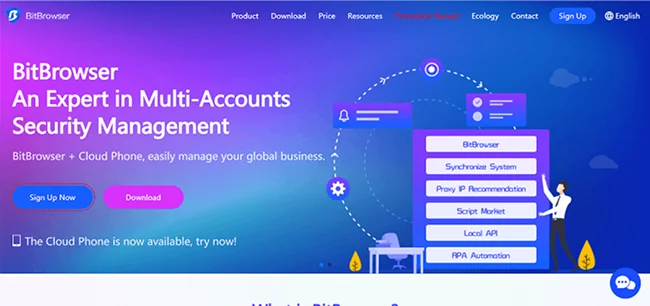
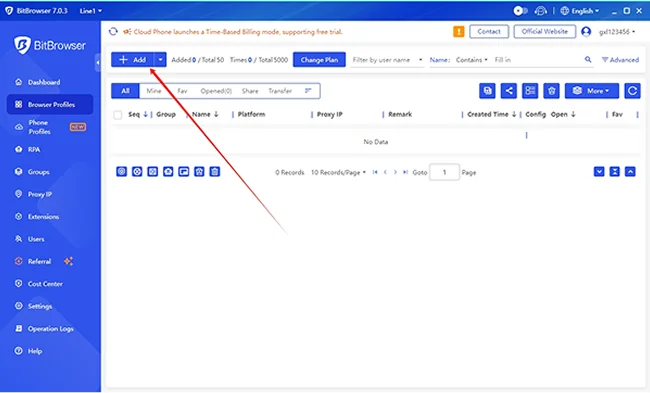
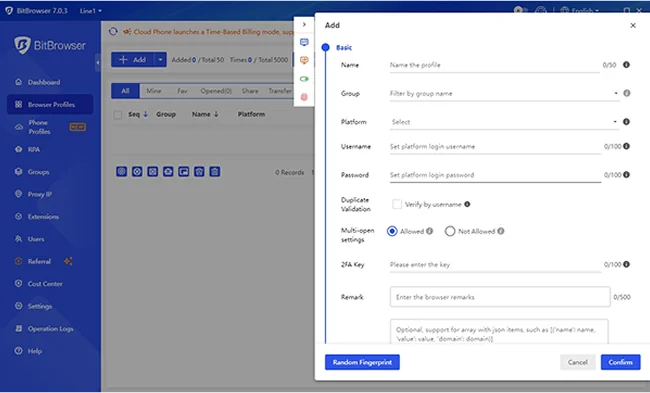
BitBrower lets you run and switch multiple accounts and browser windows from one device. The undetectable browser uses proxy IP addresses and creates unique digital fingerprints for each browser profile, preventing associations between windows that could lead to account bans. BitBrowser minimizes the risks of your accounts being detected, blocked, or banned, and keeps all your accounts safe.
Pros & Cons
Pros
- Multi-account management
- Intuitive interface
- Anti-detection features
- Fast performance
- Fingerprint protection
- Secure browsing
- Proxy integration
- Affordable pricing
- Privacy protection
- Easy profile management
- Profile isolation
- Responsive customer support
- Team collaboration
- Cloud phone feature
- Anti-tracking
- Cross-device support
- Free tier
- Local API support
- Minimalist design
- Plugin support
- Resource efficiency
- Smooth synchronization
Cons
- Advanced rpa script management
- Learning curve
- Occasional syncing delays
Tool Details
| Categories | Ad blockers, Safety and Privacy platforms, Crypto exchanges |
|---|---|
| Website | www.bitbrowser.net |
| Added | May 27, 2024 |
| Platforms | Web |
| Social | Twitter · Facebook |
Recent Reviews (9)
I chose BitBrowser because it solves a very specific pain point, I had managing multiple online accounts without getting flagged or banned. it's affordable as well.
"I considered a few others, like GoLogin and AdsPower, which are also popular. But I chose BitBrowser specifically because of its price-to-features ratio when scaling up. It offered a larger number of fully featured profiles for a much better price point, and the Cloud Phone feature for mobile emulation truly made it stand out as a more comprehensive solution."
Because it was cheaper than AdsPower Browser and all functions can be satisfied.
BitBrowser is secure, efficient, and reasonably priced.
BitBrowser have cloud phone features
used for work
BitBrowser is a powerful, multi-account browser designed primarily for managing multiple digital identities securely and efficiently—ideal for e-commerce sellers, digital marketers, affiliate managers, and social media professionals. Built with anti-detection and fingerprint isolation at its core, BitBrowser creates separate, sandboxed browser environments that mimic real user profiles, helping users avoid bans or restrictions on platforms like Amazon, Facebook, TikTok, or Google Ads. Key Strengths: Robust Fingerprint Spoofing: Effectively masks or customizes browser fingerprints (Canvas, WebGL, fonts, time zone, etc.) to prevent tracking. Team Collaboration: Supports shared profiles with role-based access—useful for agencies or remote teams. Cloud & Local Sync: Offers both cloud backup and local profile storage options for flexibility and data control. Automation-Friendly: Integrates well with automation tools and bots via API or proxy support. User-Friendly Interface: Cleaner and more intuitive than many competitors (e.g., Multilogin, Dolphin Anty). Considerations: While highly capable, advanced features may require a learning curve for non-technical users. Pricing can add up for large-scale operations, though it remains competitive. Verdict: BitBrowser delivers strong anti-detection performance, team functionality, and ease of use—making it a top-tier choice for professionals managing multiple online accounts at scale. Highly recommended for freelancers and agencies in e-commerce, ad management, or social media growth.
My overall experience with BitBrowser has been very positive. Firstly, its interface is clean and intuitive, making it easy to use for both beginners and experienced users. The multi-account management feature is very powerful, allowing users to easily switch and manage different browsing environments, which is especially useful for those who need to operate in bulk. Additionally, BitBrowser does a great job in terms of security and privacy protection, making it very trustworthy. Of course, there are some areas for improvement. For example, the setup interface for some advanced features could be more user-friendly to help users get started faster. If more third-party plugin support could be added, the tool would become even more flexible and powerful. Compared to other similar tools I have tried, BitBrowser performs better in terms of stability and ease of use, especially with its multi-account management and anti-fingerprint technology. Overall, I highly recommend BitBrowser!
BitBrowser shines in its team collaboration features. For marketing agencies or small teams managing multiple clients, being able to share profiles, assign permissions, and protect data centrally is a big win. I also appreciate the optional cloud-phone / emulator (BitCloudPhone) for real-device testing; it adds flexibility for those needing mobile-like behavior without owning lots of hardware. Performance is stable—no obvious slowdowns even when many profiles are in use. Also, their support via help center / user cases is responsive and helpful, which gives confidence using it in more serious or high-stakes contexts.
Frequently Asked Questions about BitBrowser
When did BitBrowser become popular?
BitBrowser became popular around May 27, 2024.
What are the main advantages of using BitBrowser ?
The top advantages of BitBrowser include: multi-account management, intuitive interface, anti-detection features, fast performance, fingerprint protection.
What are the disadvantages of BitBrowser ?
Some reported disadvantages of BitBrowser include: advanced rpa script management, learning curve, occasional syncing delays.
What is BitBrowser 's overall user rating?
BitBrowser has an overall rating of 5.0/5 based on 42 user reviews.
What type of tool is BitBrowser ?
BitBrowser belongs to the following categories: Ad blockers, Safety and Privacy platforms, Crypto exchanges.
Related Ad blockers Tools

Blokada
The best mobile ad blocker, free and open source

Hush for Safari
Block nags to accept cookies and privacy invasive tracking

Focus Bear
Block Distractions. Build Habits. For ADHDers by ADHDers.

Never Ending Netflix
Automatically skip intros and credits 📺

Ghostery
Ghostery helps you browse smarter by giving you control over ads and tracking technologies to spe...

Just Focus
Simple website blocker for Chrome 🙅💻
Related Safety and Privacy platforms Tools

Proton
Privacy by default

Temporary Number - Fake Phone Number
Temporary Phone Number for Online Verification

Ocean Protocol
The open-source & privacy-preserving data sharing protocol

Kanary
Find exposed personal information & delete it.
Super App Lock
Lock & Hide Apps, Protect Privacy, Screen Time Control

EyesOff
EyesOff alerts you when someone peeps at your screen
Related Crypto exchanges Tools

Grizzly.Fi
Earn a predictable income with your crypto

Sharpe Labs
AI-Powered Crypto Intelligence Terminal

PowerTrade
Trade BTC & other crypto options on the go, now on iOS

Feeturn
Get cashback on your Perp DEX trading fees!

Paxful
Buy bitcoin safely, easily and instantly

Coinbase
The easiest place to buy and sell crypto
Compare BitBrowser :




Don't Get Fooled by Fake Social Media Videos
The world's first fact checker for social media. Paste any link and get an instant credibility score with sources.
Try FactCheckTool Free