


What is Wispr Flow?
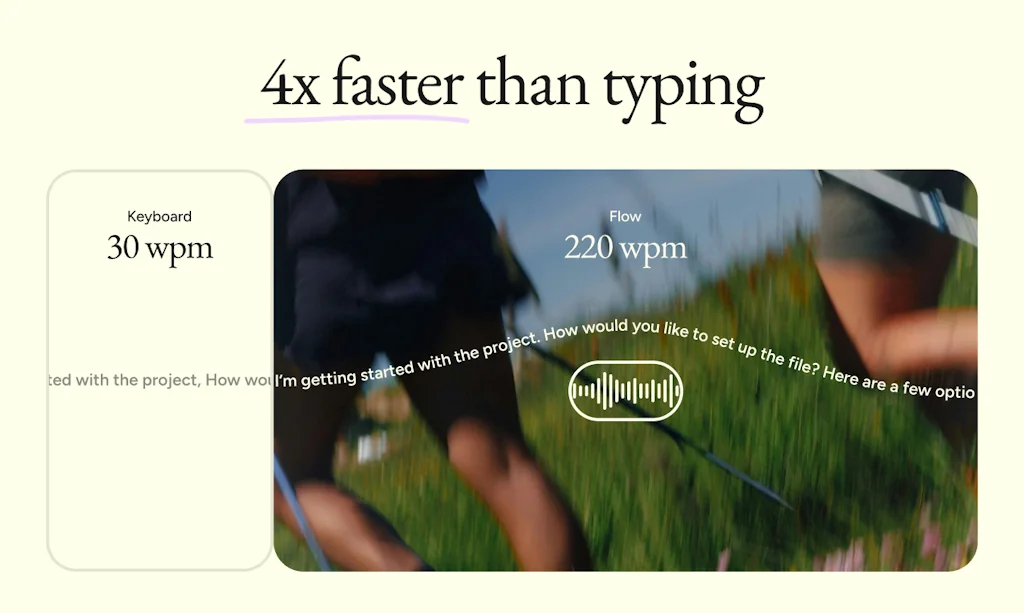
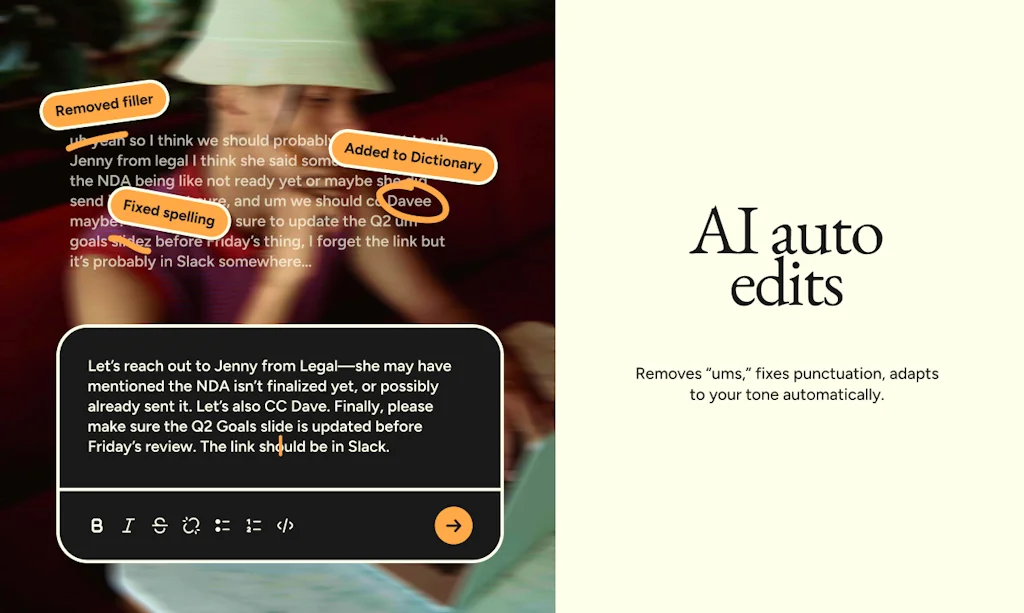
Wispr Flow is a voice-powered dictation tool that helps you write 4x faster across all your apps. Speak naturally, and Wispr Flow transforms your voice into perfectly formatted text with real-time auto-edits, tone matching, and support for over 100 languages. Whether you’re writing emails, reports, or coding, Wispr Flow saves time and eliminates manual edits. Unlock seamless productivity and streamline your workflow—effortlessly and accurately.
Pros & Cons
Pros
- Productivity boost
- Voice-powered dictation
- Fast performance
- Easy to use
- High accuracy
- Multilingual support
- Cross-app functionality
- Excellent integration
- High quality outputs
- Real-time auto-edits
- Free tier
- Low latency
- Reliable performance
- Tone matching
- User-friendly interface
Cons
- Complex setup
- Privacy concerns
- High CPU usage
- Resource intensive
- System integration issues
- Uninstall issues
- Browser integration issues
- High accuracy
- Lack of customer support
- Slow performance
Tool Details
| Categories | AI Dictation Apps |
|---|---|
| Website | wisprflow.ai |
| Added | September 30, 2024 |
| Platforms | Web · iOS |
| Social | Twitter · Instagram · LinkedIn |
Recent Reviews (13)
It's an everyday, must-have app that has accelerated my efficiency more than any other AI tool has. I'm slowly forgetting how to type, and I find typing annoying and cumbersome. In these days of heavy prompting, it is so much easier just to speak your prompts than it is to type them. Another nice part about using Wispr for prompting is that AI can translate any punctuation discrepancies no problem. So you end up saving infinite time not messing around with trying to get your message perfect. You guys killed it with this app! Thank you!
We use Wispr Flow to power voice mode in Warp because it’s the most natural-feeling speech-to-text experience we’ve tried. Low latency, high accuracy, and it actually fits into a developer workflow without getting in the way. It makes talking to agents feel fluid instead of clunky — which matters a lot when you’re iterating quickly.
Traditional speech-to-text tools and a few other AI dictation apps, but they felt either too basic or too isolated from real workflows. Wispr Flow stood out because it works everywhere and actually adapts to how you write.
Wispr Flow is a daily driver for me. It's one of less than 10 apps that opens on login. Voice has now become my main input device for any work on my computer, despite the fact that I can type relatively quickly. I'd give the app 4.5/5 stars because I've experienced a few hiccups, specifically around some transcripts not loading or issues with some of the transcriptions. As Wispr Flow is a relatively new app, I expect that they're going to improve these things, and I'll come back and update it to 5 stars once these small annoyances are addressed.
Used it for multiple regional as well as global languages for some fun stress-testing. Gotta say, love the accuracy of the multilingual scripts and dialects, and that's especially impressive given that this is only the first iteration of such a product. Certainly beats the multilingual support of all the big-shot voice dictation offerings that I've dipped my toes into over the years - and by a large margin. Talk of a moat! From an ethical perspective, I really appreciated that the toggle on personal data usage for training Wispr's models is off by default. I know you guys didn't NEED to do that (given that none of the leading AI companies leave it off by default), but the fact that you chose to do it anyway shows your broader commitment to doing the right thing and makes me feel like I can trust Wispr with my most crucial personal and professional correspondence without worrying about anything shady going on under the hood with my data, be it behavioural data or otherwise. Not to mention, for a company that aims to radically boosts the ways in which everyday people interface with any and all computers, I don't know if there could be a higher honour than getting an endorsement from Woz, who's essentially the father of the personal computer revolution. I know he rarely offers such an endorsement, which makes this one mean all the more for Flow's credibility in the eyes of a veteran tinkerer. Will Flow offer models other than Perplexity in future releases?
I've truly tried every speech-to-text application out there. However, I've ultimately settled on Flow Voice. While other applications work for free, the speed and additional benefits of Flow Voice are simply compelling for me. I use speech-to-text around the clock, and with the exception of AI-refined outputs that are more complex and require more complicated prompts, I now use Flow Voice exclusively. I thought I knew everything about speech-to-text solutions and initially didn't even want to install Flow Voice. I'm very glad I did, because it really surprised me, and I never would have thought that I'd now be using Flow Voice almost exclusively. I'm also willing to pay for it once it becomes a paid service. The comfort and workflow enhancement it provides compared to other applications is hard to describe. It's something you have to experience for yourself. The advantages that stand out for me are: Unmatched speed: Flow Voice is significantly faster than other applications I've tried. Reliability: It consistently produces accurate transcriptions. Seamless integration: It fits perfectly into my daily workflow. User-friendly: The interface and functionality are intuitive and easy to use. Versatility: It handles most of my speech-to-text needs, except for very complex AI-refined outputs. Time-saving: The efficiency of Flow Voice has notably improved my productivity. Worth the upcoming investment: Although Flow Voice will become a paid service in just a few days, I believe the benefits will far outweigh the cost for me. I'm prepared to subscribe because of the value it adds to my work. In conclusion - Its performance and features have exceeded my expectations, making it an indispensable tool in my daily work routine. If you're considering a speech-to-text solution, I highly recommend giving Flow Voice a try – you might be as pleasantly surprised as I was. Keep in mind that after a trial period, it becomes a paid service with full functionality. However, based on my experience, it's likely worth the investment for those who heavily rely on speech-to-text technology.
Insanely accurate and scarily human. To the point where it feels like Jarvis from Ironman. I have used it to make quick edits on my documents. Simple .docx documents. Haven't done anything fancy yet but the speech to text is really good and can easily replace your writing if you prefer to speak more. There are many advanced and nifty features which look really useful for fulltime users but since I'm a 100 wpm typist, I am using this for document navigation and edits only right now. However, I am very impressed by the product and will slowly learn more about the other features since I can easily see how they would optimize my workflow to a great degree. Thanks for a competitive writing aid Wispr! Hare Krishna!
WOW, seriously have never encountered such a shady app or business ever (even though the product is great at what it does). The Wispr Team deactivated my Slack account on their workspace after asking polite and totally fair questions there in my mind. SERIOUSLY shady inner working in this app BEWARE. And RED FLAG how they treat their users. My post on Slack before they banned me on their Slack (oh and I also said that I was going to uninstall because I realized after removing it from login items, because I was done with it for a while, only to realize THAT IT WILL INJECT ITSELF INTO YOUR LOGIN ITEMS AGAIN SOMEHOW ON LOGIN SO YOU LITERALLY CAN'T GET RID OF THE APP UNLESS YOU NUKE IT WITH APPCLEANER. "Hey Wispr team, I've been using Flow for a while now, and I've got to say, the functionality is impressive. However, I have several concerns: 1. System Integration: The app for some reason ruins my right-click context menu in Firefox. Extension options in right-click context menus disappear on hover. I spent hours troubleshooting, even ended up nuking my Firefox setup, only to find out Flow was the culprit. What is it doing in Firefox anyway? Suddenly, I'm seeing the Wispr Flow logo in my Chrome address bar. I don't remember enabling this, and there seems to be no way to turn this off? The app adds itself to login items every time it's launched. This is not standard behavior and feels intrusive. 2. Resource Usage: The app is a whopping 800MB, which feels kind of big for a dictation tool? It's constantly using about 8% CPU, even when idle. What's it doing in the background? Launch time is around 10 seconds with quirky loading messages. What's really happening during this "setup"? 3. Deep Integration and Privacy Concerns: The onboarding checklist actually tracks actions across apps. It knew when I used Discord, ChatGPT, mail and other apps which I don't remember 100%. This level of system awareness is alarming. Your promo video shows the app using context to correctly spell unusual names in emails. How exactly is this context gathered? Does it capture my screen or what? 4. Transparency Issues: Your privacy policy is vague and broad. It doesn't provide clear limits on data use or specific explanations of what data is collected in different scenarios. The policy mentions using customer content to train AI models. Does this include my dictations and the context you gather? There's no clear documentation about the app's system interactions or the full extent of its capabilities. 5. Browser Integration: The Chrome and Firefox integrations appeared without clear user consent or easy ways to disable them. What exactly are these browser integrations doing? Are they monitoring my web activity? 6. Data Collection and Usage: Given the app's deep integration and context awareness, what exactly are you collecting? How is this data being used beyond the immediate dictation functionality? Are you sharing this data with third parties? If so, with whom and for what purposes? 7. User Control: There seems to be a lack of granular controls for the app's various integrations and features. How can users opt out of specific data collection or feature integrations? How can users opt out of injections into certain apps? Shouldn't it be opt-in? 8. Security Concerns: With such deep system access, what security measures are in place to protect user data? How are you safeguarding against potential misuse of the app's extensive permissions? Don't get me wrong - the core functionality of Flow is impressive. The dictation accuracy, speed, and cross-app functionality are genuinely useful. But right now, using Flow feels like I've given an unknown entity unfettered access to my digital life. Given these concerns, I'm hesitant about becoming a paid subscriber. We need some real transparency here: 1. Can you provide a detailed, technical explanation of Flow's system access and integration methods? 2. What specific data are you collecting, and how exactly is it being used and protected? 3. Can we get more granular user controls over the app's various features and integrations? 4. Are there plans to optimize the app's resource usage and size? 5. How are you ensuring user privacy and security given the app's deep system access? I want to continue using Flow, but I need to fully understand what I'm permitting on my system. Looking forward to your detailed response." I've got some email correspondence with them and I had more questions in the Slack which went unanswered.
"How would you feel if you could never use Wispr Flow again?" is a classic question to evaluate whether customers find a product useful. After using WF for a few months, my answer is clear: dictation or typing without it now absolutely sucks. Whenever I try to dictate something into my brand new iPhone or type on someone else's computer, I just feel like I'm driving in 2nd gear... Wispr Flow is just so incredibly efficient in helping me get my thoughts into a text format, onto a computer. To me, both the efficiency of dictation and the amazing accuracy (even with incredibly obscure words, mixing up different languages in one sentence, etc.) - it works 95-99% of the time without having to edit the output. This is what science fiction promised us decades ago.
I've been playing with this today, and I have to say wow, this works so much better than I assumed it would. I actually use Apple's built-in dictation quite a bit, but I have to speak my punctuation and I often stop to edit which ruins my flow. I also use other voice notes apps a lot and then I'll accidentally speak the punctuation within those and I'm just confusing myself. With this I can have one streamlined way of collecting or expressing my thoughts. I am just really loving it so far. Yes, I did write this using the app itself.
Was one of my favourite apps over the last year, but suddenly broke, and support is nowhere to be found (despite sending emails and logging support request via the app). Suddenly, instead of transcribing what I say, it's either: 1) transcribing a chatbot's *response* to what I say, or 2) opening a browser tab and sending my transcription to Perplexity. Both are highly undesirable for privacy or productivity. The problem has persisted now for 1-2 weeks
Frequently Asked Questions about Wispr Flow
When did Wispr Flow become popular?
Wispr Flow became popular around September 30, 2024.
What are the main advantages of using Wispr Flow?
The top advantages of Wispr Flow include: productivity boost, voice-powered dictation, fast performance, easy to use, high accuracy.
What are the disadvantages of Wispr Flow?
Some reported disadvantages of Wispr Flow include: complex setup, privacy concerns, high CPU usage, resource intensive, system integration issues.
What is Wispr Flow's overall user rating?
Wispr Flow has an overall rating of 4.7/5 based on 55 user reviews.
Is Wispr Flow available on mobile devices?
Yes, Wispr Flow is available on iOS (App Store).
What type of tool is Wispr Flow?
Wispr Flow belongs to the following categories: AI Dictation Apps.
Related AI Dictation Apps Tools

AI dication by Snaply
Free, 100% local, AI dictation for Mac

CyphrKey
WisprFlow for vibe coders w/ voice shortcuts
Dictly
Private, on-device dictation — fast, styled and 100% offline

Pickle
Transcribe and analyze phone and video conversations
VoiceNotes
One tap record with live transcription + automatic cleanup
Voice Anywhere
A floating mic that turns your speech into text anywhere
Compare Wispr Flow :




Don't Get Fooled by Fake Social Media Videos
The world's first fact checker for social media. Paste any link and get an instant credibility score with sources.
Try FactCheckTool Free