
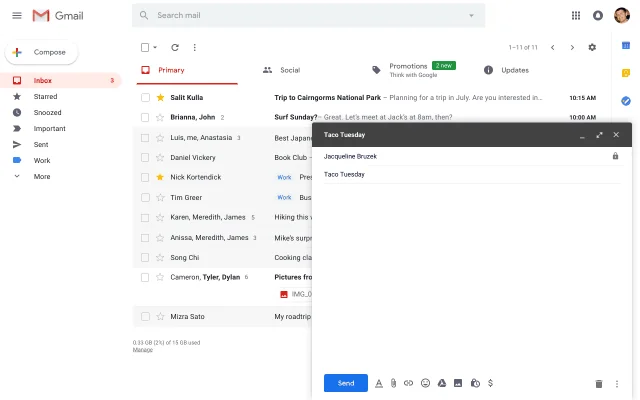
What is Gmail?
Gmail is a free email service developed by Google. Users can access Gmail on the web and using third-party programs that synchronize email content through POP or IMAP protocols. Gmail started as a limited beta release on April 1, 2004 and ended its testing phase on July 7, 2009.
Pros & Cons
Pros
- Reliable email service
- User-friendly interface
- Integration with Google services
- Strong spam filtering
- Powerful search function
- Labels and filters
- Clean interface
- Fast performance
- Accessibility across devices
- Generous free storage
- Smart features
- Email categorization
- Security features
- Seamless integration with Google Workspace
- Mobile app
- Free tier
- Gmail API
- Https://android-review.googlesource.com/c/platform/frameworks/support/+/3943741/comments/39a09d0f_8b270a36
- Multi notes withdrawal
- Reliable performance
- Smart compose
Cons
- Interface clutter
- Privacy concerns
- Ads in the inbox
- Occasional misclassification of emails
- User-friendly interface
- Android-latest-release
- Labels and filters
- Powerful search function
- Smart features
- Strong spam filtering
Tool Details
| Categories | Email clients |
|---|---|
| Website | www.gmail.com |
| Added | January 8, 2014 |
| Platforms | Web · iOS |
| Social |
Recent Reviews (13)
Gmail has been my go-to email service for years, and there's a lot to admire. Its interface is intuitive, the spam filters are top-notch, and the integrations with other Google services are seamless. However, perfection is elusive. There are moments when I wish for more advanced customization options and finer control over certain features. All in all, Gmail is a solid choice for email, but there's always room for a sprinkle more of innovation.
Gmail is hands-down the most reliable and intuitive email platform I’ve ever used. From smart filters, auto-categorization, and lightning-fast search to seamless integration with Calendar, Meet, and Google Drive — it’s built for productivity. I especially love the “Undo Send” and Smart Compose features — they’ve saved me more than once! Whether personal or professional, Gmail just works.
I use it for work and personal. I don't know if anything is ever going to surpass this incumbent. it's connected to the other thing i use everyday - Google Calendar. so, it's nice to have the suite of products all working together.
We chose Gmail because it offers a highly reliable, secure, and user-friendly email experience backed by Google’s global infrastructure. Its powerful search capabilities, intelligent spam filtering, seamless multi-device sync, and integration with the broader Google Workspace ecosystem make it an ideal choice for both personal and team communication. Gmail consistently delivers the performance and stability we need with minimal maintenance or overhead.
Gmail just works. It’s fast, intuitive, and seamlessly connected with other Google services like Calendar, Drive, and Meet.I like that everything syncs perfectly across all devices and that I never have to worry about reliability. Plus, the spam filter is by far the best I’ve ever used.For both personal and professional use, it’s simply the most dependable email platform out there.
Gmail is by far one of the most reliable and user-friendly email platforms I’ve used. The interface is clean, intuitive, and works seamlessly across desktop and mobile. I really appreciate the powerful search function—it makes finding old emails quick and effortless. The spam filters are excellent and save a lot of time by keeping my inbox organized. Integration with other Google services (Drive, Calendar, Meet) makes productivity smoother, and I can easily manage both personal and professional communication in one place. Labels, filters, and smart categorization help me stay on top of important messages without feeling overwhelmed. If I had to point out one area for improvement, it would be to offer even more customization options for the inbox layout and themes. But overall, Gmail sets the gold standard for email tools, and I highly recommend it to anyone looking for reliability and efficiency.
Gmail is generally considered one of the most reliable and user-friendly email platforms available. ✅ Pros: Powerful search (thanks to Google): You can quickly find emails using keywords, dates, attachments, etc. Excellent spam filtering: One of the best at keeping unwanted emails out of your inbox. Integration with other Google services: Works seamlessly with Google Calendar, Drive, Docs, Meet, etc. Storage: Generous free storage (15 GB shared across Gmail, Drive, and Photos). Smart features: Like autocomplete, Smart Reply, and customizable filters. ❌ Cons: Privacy concerns: Being a Google product, it raises flags for users concerned about data collection and ad-targeting. Interface clutter: Some find the interface busy or unintuitive, especially with updates like “tabs” (Primary, Promotions, Social). Ads: Even though they’re not too intrusive, Gmail does show ads in the Promotions tab.
The Gmail app is my go-to for managing emails on the go. It's fast, reliable, and packed with features that make email management simple and efficient. Whether it’s switching between multiple accounts, using labels, or accessing smart replies — the experience is smooth and intuitive. What I like: Clean UI: Easy to navigate and visually organized. Smart categorization: Automatically separates Primary, Promotions, and Social emails. Search function: Powerful and accurate, even with large inboxes. Spam filtering: One of the best out there — rarely lets junk through. Minor improvements could include better offline support and slightly faster loading in low-network areas, but overall, the app performs consistently well.
Gmail: The reliable veteran of email — solid, smart, but a bit dated. 💼📧 Pros ✅ Rock-solid reliability: Rarely crashes. You can trust it to just work. Powerful search: It’s Google, after all. Finding old emails is a breeze. Excellent spam filtering: One of the best in the game. Seamless syncing: Works smoothly across web, mobile, and desktop. Plugin-friendly: Plays well with tools like Notion, Zoom, and Trello — a productivity nerd’s dream. Cons ❌ Outdated interface: Functional, but lacks the modern flair of newer apps like Superhuman or HEY. Ads in your inbox: Clearly labeled, but still intrusive. Privacy concerns (past and present): Though Google has improved, its history of scanning emails leaves a mark. Slow access in some regions: Especially in China — VPN often needed.
Gmail continues to set the standard for modern email communication. With its clean interface, powerful search functionality, and seamless integration with the Google ecosystem, Gmail is both user-friendly and highly efficient. One of Gmail's standout features is its smart organization—automatically sorting emails into categories like Primary, Social, and Promotions, which helps keep the inbox focused and clutter-free. Features like Smart Compose and auto-reply suggestions also improve productivity by saving time and minimizing repetitive typing. Security is another key strength, with built-in spam protection, two-step verification, and robust phishing detection ensuring a safe and reliable communication experience. Whether you're using it for personal, academic, or business purposes, Gmail delivers consistency, speed, and intelligent tools that make managing email simpler and smarter. Overall, Gmail remains a top-tier choice for anyone looking for a powerful, reliable, and intuitive email platform.
Gmail is arguably the most influential email service of the modern era—widely used, feature-rich, and deeply integrated into Google’s ecosystem. But like Chrome, it comes with its own pros and cons. ✅ Pros: Powerful Search Gmail uses Google’s search capabilities, so finding old emails is incredibly fast and accurate—even with vague keywords. Spam Filtering Its spam filter is one of the best in the industry, catching the majority of unwanted messages with few false positives. Generous Free Storage You get 15 GB of shared storage (Gmail, Google Drive, Photos), which is more than enough for most casual users. Smart Features Features like Smart Compose, automatic email categorization (Primary, Social, Promotions), and AI-powered replies help streamline email workflows. Integration with Google Workspace Seamlessly works with Google Calendar, Docs, Meet, and Drive. Ideal for collaboration and productivity. Mobile App The Gmail app is polished, fast, and packed with features. Arguably better than most native email apps. ❌ Cons: Privacy Concerns Google no longer scans emails for ad personalization, but metadata and usage patterns still contribute to its data ecosystem. If privacy is paramount, this is a red flag. Interface Clutter Some users find Gmail's interface (especially on desktop) cluttered and overwhelming, especially with all the tabs and categories. Ads in the Inbox Gmail inserts ads into the Promotions tab that look like emails. While not intrusive, it's a reminder that you're using an ad-supported service. Too Much Automation for Some Features like automatic tabbing (Primary/Social/Promotions) can hide important emails or confuse users unfamiliar with the setup.
Pros: Powerful Search: Google's search engine integration makes finding old emails fast and easy. Spam Filtering: Excellent spam and phishing protection. Integration: Seamlessly integrates with Google Workspace (Docs, Drive, Calendar, Meet, etc.). Storage: 15GB of free storage shared across Gmail, Drive, and Photos. Accessibility: Easy access across devices and platforms, with solid mobile apps. Add-ons & Extensions: Supports productivity tools like Boomerang, Grammarly, Trello, etc. ❌ Cons: Privacy Concerns: Google scans email metadata for ad targeting and data analytics (though content scanning for ads has stopped). Promotions Tab Issues: Important emails sometimes land in Promotions or Spam. Interface Clutter: The UI can be overwhelming for new users due to many features. 🔎 Use Cases: Great for personal and professional communication. Commonly used by startups, freelancers, and large enterprises alike. Ideal if you already use other Google services.
Gmail still has the best email interface out all of the programs that I've used. It's "Sign in with Google" feature makes it incredibly easy to create accounts with websites or apps without having to remember another email and password combination. However, as of early 2025, Google has removed it's pledge to abstain from using AI for potentially harmful applications, such as weapons and surveillance, according to the company's updated "AI Principles". The now-deleted section titled “AI applications we will not pursue” from their 2018 "AI Principles" had explicitly stated that Google would refrain from developing technologies “that cause or are likely to cause overall harm,” with weapons being a specific example.
Frequently Asked Questions about Gmail
When did Gmail become popular?
Gmail became popular around January 8, 2014.
What are the main advantages of using Gmail?
The top advantages of Gmail include: reliable email service, user-friendly interface, integration with Google services, strong spam filtering, powerful search function.
What are the disadvantages of Gmail?
Some reported disadvantages of Gmail include: interface clutter, privacy concerns, ads in the inbox, occasional misclassification of emails, user-friendly interface.
What is Gmail's overall user rating?
Gmail has an overall rating of 4.8/5 based on 521 user reviews.
Is Gmail available on mobile devices?
Yes, Gmail is available on iOS (App Store).
What type of tool is Gmail?
Gmail belongs to the following categories: Email clients.
Related Email clients Tools
kachiiing
Payment collection made simple.

Ugly Email
Get back your email privacy. Block email tracking.

Mailbird
One App. All your email accounts.

FeaturePanel
Get your customers back to you
Kiwi for Gmail
All your Gmail accounts in one place, at the ready.

@heyyyyyyyyyyyy.com
Disrupt your unremarkable gmail.com's and stand out.
Compare Gmail :



Don't Get Fooled by Fake Social Media Videos
The world's first fact checker for social media. Paste any link and get an instant credibility score with sources.
Try FactCheckTool Free