

Superpowered
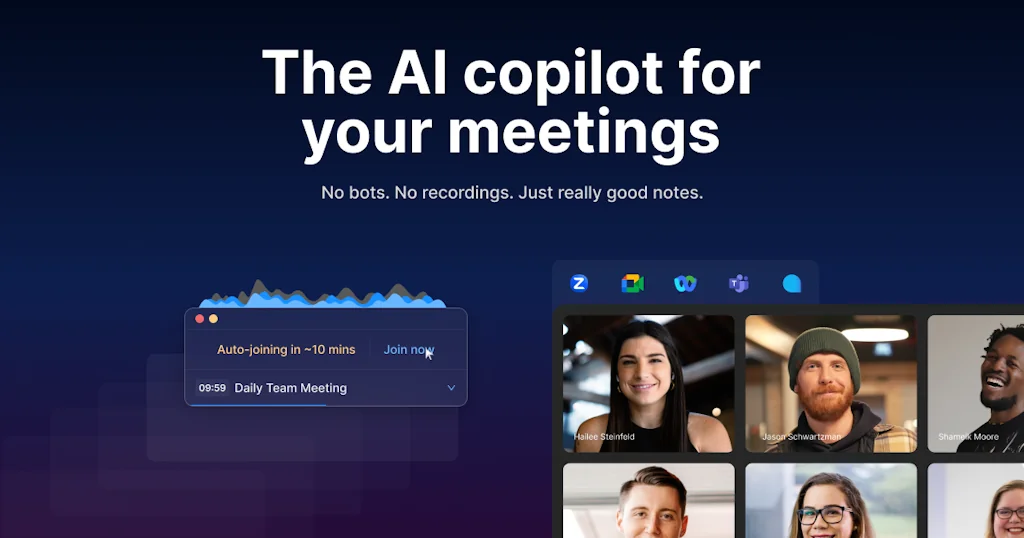
The AI copilot for your meetings
What is Superpowered?
No bots. No recordings. Just really good notes.
Pros & Cons
Pros
- Meeting reminders
- AI notes
- Auto-join meetings
- Simple UI
- Calendar integration
- Meeting countdown
- Customer support
- Slack integration
- Cross-platform support
- Customizable notifications
- AI templates
- Fast performance
- Meeting status updates
- Privacy and security
Cons
- Spammy behavior
- Invasive notifications
- Complex setup
- High pricing
- Slack integration
- Slow AI notes generation
Tool Details
| Categories | Note and writing apps, Calendar apps, CRM software, Meeting software, AI notetakers |
|---|---|
| Website | superpowered.me |
| Added | February 9, 2021 |
| Platforms | Web |
| Social |
Recent Reviews (13)
Love, love, love the app. I have actually been actively looking for a solution that could take notes in meetings that were not tied to specific meeting apps (like Zoom, WebEx, Google Meet, etc.) since I use my own custom version. So this solution is PERFECT. I am sure we will start seeing copycats so push this product like crazy and create a buzz to get as much market share as quickly as you can! I have just briefly tested it and it seems to work flawlessly. One question I have (just curious), is there a way to control where your app gets its audio stream from? I realize it is picking up the audio from the computer system so it knows what the other guest is saying, however since many of us have multiple mics, is there any way to control where it gets the Superpowered user's audio from? Thanks again...and 5 STARS from me!
I have a high bar for consumer tech that I'll pay for, but I LOVE Superpowered! Got all my coworkers to use it :) Used to rigorously take notes for meetings and then spend time formatting the notes/action items, now I don't have to worry about it. Also love how it doesn't disrupt the meeting! One product feedback suggestion: I wish the meeting (+ banner) pop up was smaller or at least the size could be customized because I have a 13in mac and sometimes it blocks part of my workflow.
Loooooooooove it. The only issue is that now, my brain has completely delegated my calendar to Superpowered, and when I forget to start the software for some reason, I also forget to join meetings. I like the AI notes feature which gives great results even if the meeting is in another language than English. The only thing I'd love to have is the ability to change the notes language depending on the language spoken by meeting guests. Anyway:
I have been using Superpowered for the last 7 months, and since then I have been confidently running my codes until the very last second before a call starts with no fear of missing the call, thanks auto-join and countdown. Also as the superpowered AI notes came along, I increased my work efficiency by 10% per week ie. I get 4 hours of my work time that I earlier spent on documenting project/ad-hoc scopes, writing targets, and creating descriptions for tasks. I can't imagine meetings without superpowered autojoin and AI notes and it's also the smooth workflow, It's one of those things I never knew I much needed.
If you're like me, watching the clock to make sure you're on time totally distracts you from whatever you're supposed to be working on. Superpowered lets me maximize my hyperfocus and nudge me to the next task at the right time. Here are the three ways I use Superpowered: 1️⃣ Superpowered syncs with my calendar to tell me when my next meeting or event starts. That means that I can time block my calendar for specific tasks and be on time for meetings. 🥳 2️⃣ Superpowered gives me a 10-minute heads-up, then it counts down until the event starts. I use that time to find a stopping point in whatever I'm working on, wrap up my conversations, and make more espresso. ☕ 3️⃣ And if I'm running a few minutes behind, Superpowered lets me notify other guests with one tap. This lets me stay engaged and present in my conversations without leaving the next person wondering where I am. There's more to Superpowered than these features that I haven't tried yet like AI notes, auto-join, and video conferencing and Slack integrations. I don't need these right now, but I'm glad to have them available if I decide those features would benefit me in the future.
===== updated review ===== a recent update has moved Superpowered out of the sidebar and to a stand-alone app. Since it is no longer in the sidebar, there is no place to park/hide a meeting while you are trying to share your screen with others. What was once smooth and innovative is now just clunky and the same old. The AI notes can take 10-15 minutes (or more - if ever) to generate from a 30-minute call. The calendar is not smart enough to jump to the current date when you return to your computer in the morning. To be clear, the UI/UX has changed but also the performance has significantly changed causing a sub-par experience ==== original review ==== It helps keep me on track with meeting alerts, auto-join, and notes function. What is terrific about the Notes capabilities is that it stays on top of all your other windows/browsers allowing you to make notes will keeping the other windows in focus. The Notes are all stored in one location, making it easier to find later. I'm also a fan of the day's agenda. Its streamlined view makes it very easy to know what's next, but also the horizontal graph of gaps in your day lets me easily see where I can jump.
Have you seen the notification saying you have a meeting in 10 minutes but are so engrossed in reading an article or replying to a message that 15 minutes go by, and you're late for an important Zoom call? Superpowered solves this problem for me by offering to auto-join the Zoom call. I click to auto-join when it's time, and if I'm tunnel-visioned on replying to an email, the Zoom meeting launches and I'm right where I'm supposed to be. Other nifty features like the meeting end countdown help me manage my time in a meeting and be on time for my next call.
This has released me from being a calendar hawk. I used to have such anxiety about forgetting an important meeting and this has alleviated that stress. In the past, the meeting warning would pop up 10 minutes before, I'd acknowledge and then proceed with my task - forgetting about the meeting! I love that superpowered pops up and stays there in a non-obtrusive way plus - I can move it anywhere on my screen during the countdown! I know exactly how much time I have left if I need to quickly sneak in a bathroom break or fill up my coffee. I am a big fan of this tool!
I love using superpowered! I am constantly in meetings and sometimes overlapping meetings and being able to pull up my following meeting with just one click or with a CMD + E is super useful. I also love the way I can click on the items, see the invited users, and details of each meeting. I also really love the count down it shows of how much time is left until the next meeting. I just glance at it and it allows me to determine if I have enough time to go get another coffee or write up that pending email I need to send. I have already recommended this to all of my co-workers!
Superpowered is a small and mighty app that helps me join meetings on time. As a busy PM, it's easy to get lost in my day between meetings and other work activities. Other notifications just don't help as much - having a persistent widget like Superpowered has been a great aid in joining meetings more punctually. Excited to see how this product evolves - there's also a great potential for note taking here and I've been happy to see incremental product improvements on that end as well.
This is my productivity go-to these days! Very intuitive time displays: letting you know how when your next calendar appt is (in 19m), a progress bar visualizing how much time in the meeting is left (helpful to keep attendees focused), and a scheduling link to send out and avoid calendar invite ping-pong. Great and responsive team that's been delivering features and improving the value of Superpowered so much even in the few short months I've been a user.
As a user for the past six months, I can attest to Superpowered's simplicity and effectiveness. With Superpowered, I never miss a meeting or appointment. Its intuitive menu bar displays upcoming reminders, allowing one to effortlessly launch Zoom or any other meeting link with just one click. And with the Note Taker app, I can easily take notes during the call and stay organized. If you're serious about productivity, Superpowered is a game changer!
Superpowered helps keep me on track to make sure I make it to meetings on time & have a clear view of my day. No hunting around for various links in my email, just click it & launch into the meeting. It lets people see my status in Slack so people do not have to manually check if I am free at that moment. It manages to remind without annoying me.
Frequently Asked Questions about Superpowered
When did Superpowered become popular?
Superpowered became popular around February 9, 2021.
What are the main advantages of using Superpowered?
The top advantages of Superpowered include: meeting reminders, AI notes, auto-join meetings, simple UI, calendar integration.
What are the disadvantages of Superpowered?
Some reported disadvantages of Superpowered include: spammy behavior, invasive notifications, complex setup, high pricing, Slack integration.
What is Superpowered's overall user rating?
Superpowered has an overall rating of 4.6/5 based on 58 user reviews.
What type of tool is Superpowered?
Superpowered belongs to the following categories: Note and writing apps, Calendar apps, CRM software, Meeting software, AI notetakers.
Related Note and writing apps Tools




Related Calendar apps Tools

Add to Calendar Button
Let users add your events to their calendars - hustle-free.
ShadowCal
Sync your Outlook Calendar to Google Calendar
Flexibits
Makers of Cardhop, Chatology, and Fantastical. 🥪 💬 📅

Taskful: The Smart To-Do List
Deadlines, meet your match.
NuraNote
develop, enhance, organize, encourage all with NuraNote

Almanac
Keep track of what's important
Related CRM software Tools



Related Meeting software Tools

reason8
Audio to text transcripts

Anytalk
Real-time video and audio translation app
BookItBoss
Book physical meeting rooms like a boss.
Spinach.io for Google Meet
Better daily standups in Google Meet
Verbally for Google Meet
Improve your meeting productivity in seconds

Sign AI
An AI-powered virtual sign language interpreter
Related AI notetakers Tools

Voiser AI: Transcriber Summarizer
transcription, transcribe, speech to text, summarize,

Hera
Prepare, join, and run your meetings with automation

Intellecs.ai
note-taking, ai chat, and flashcards in one platform
StenifyAI
Turn Chaotic Meetings into Clear Action Items

Timeless
Claude Code for Meetings

Notebook AI
Your notes, supercharged by AI
Compare Superpowered :


Don't Get Fooled by Fake Social Media Videos
The world's first fact checker for social media. Paste any link and get an instant credibility score with sources.
Try FactCheckTool Free