

ScreenPal
The easy way to capture, create and share videos and images.

What is ScreenPal?
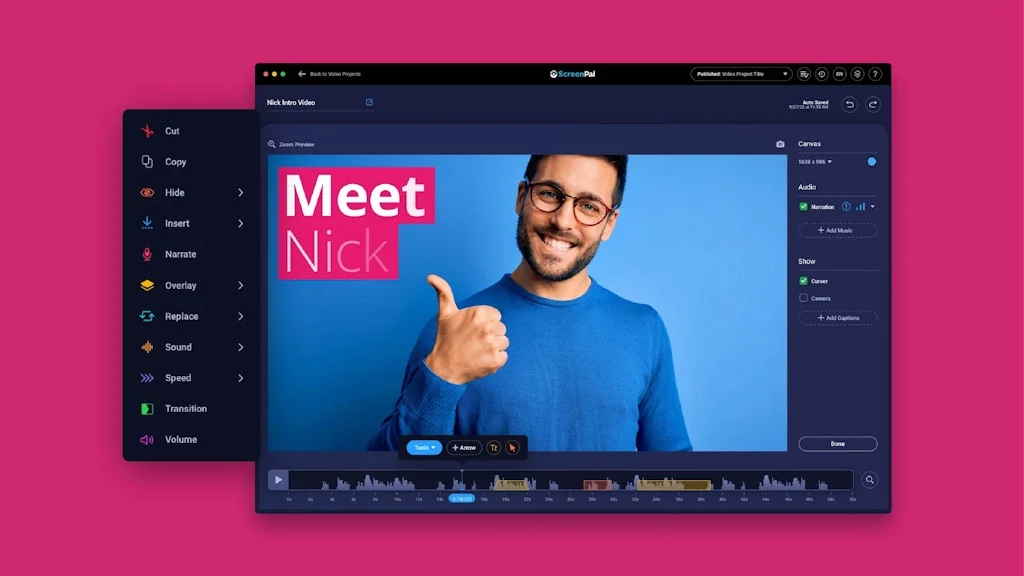
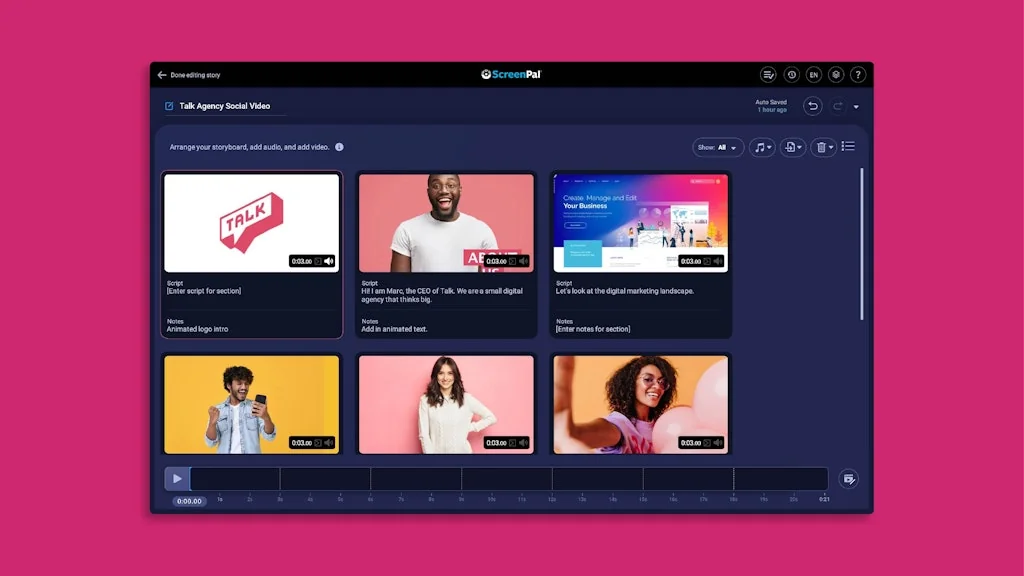
We build easy-to-use, accessible tools that empower everyone to share ideas and knowledge visually. Capture your screen, webcam or both on any device, easily edit, and share. Gather deep insights from viewers through interactive elements, quizzes and polls.
ScreenPal, (formerly Screencast-O-Matic)
Pros & Cons
Pros
- User-friendly interface
- Educational content creation
- Advanced screen recorder
- AI-powered features
- Easy screenshot editing
- Seamless sharing
- Video captions and chapters
- Blur tool
- Easy video editing
- Interactive quizzes
- Mobile app
- Price
Tool Details
| Categories | Screenshots and screen recording apps, Video editing, Video hosting platforms |
|---|---|
| Website | screenpal.com |
| Added | January 8, 2016 |
| Platforms | Web |
| Social | Twitter · Instagram · Facebook · LinkedIn |
Recent Reviews (10)
As an educator who regularly creates and stores video materials for my students, I’ve found ScreenPal to be an incredibly valuable tool. One of the features I appreciate most is how user-friendly the interface is. From recording to storing, the entire process feels seamless. It saves me time and effort, and I can trust that my students will have easy access to the resources they need. Overall, ScreenPal has significantly enhanced the way I manage and share my educational content. I highly recommend it to any teacher looking for an efficient video platform.
Screenpal - The Ultimate Tool for Effortless Content Creation and Sharing I’ve been using Screenpal for a while now, and it has truly transformed the way I create and share content. Here are some of the standout features that I absolutely love: - Easy Video Editing: Screenpal makes video editing a breeze. The intuitive interface allows me to quickly trim, cut, and enhance my videos without any hassle. - Advanced Screen Recorder: Despite its simplicity, the screen recorder is incredibly powerful. It captures high-quality video and audio, making it perfect for tutorials, presentations, and more. - Easy Screenshot Editing: Editing screenshots has never been easier. Screenpal provides all the tools I need to annotate, highlight, and customize my screenshots effortlessly. - Seamless Sharing: Whether it’s videos or images, Screenpal makes sharing content from any device incredibly easy. I can quickly upload and share my creations with just a few clicks. - Interactive Quizzes: One of the most unique features is the ability to create quizzes using the videos I’ve made. This is perfect for educational content and engaging audiences in a fun and interactive way. - AI-Powered Features: Screenpal now offers AI features that make content creation even more efficient. The AI can analyze videos and automatically generate captions, translated captions, chapters, and quizzes, saving me a ton of time and effort. Overall, Screenpal is a must-have tool for anyone looking to create and share high-quality content with ease. Highly recommended!
ScreenPal has made my life so much easier! I can use the screen recorder to share detailed questions or demos with coworkers without scheduling a dedicated meeting. The editor is also incredibly user-friendly – I typically take a while to learn new tools, but I was impressed by how intuitive this one is!
Absolutely incredible app! Helps speed up my workflow with it's quick screenshotting tool. Additionally I can edit videos to hide sensitive information using the blur tool which is huge when sharing software videos. This tool is a staple in my day to day life and cannot recommend enough!
I use ScreenPal just about everyday to make educational videos and marketing content. It is incredibly easy to learn and use, with a highly intuitive user interface. You can do so much with their screen recording and editing tools. Such a great little app!
ScreenPal's been a game changer for me in terms of productivity and communication with remote colleagues and clients. The tools are really easy to use, the price can't be beat, and the mobile app is a great addition to the toolset. Highly recommend!
I like one of the last features related to AI. When users can upload a video and then create captions and chaptres for it it is highly useful, especially for educational content.
I've been using Screenpal for years and I love it. It's so easy to use and has so many features, and it's great for someone like me who doesn't like appearing on camera.
I have used ScreenPal for years. Perfect for demonstrations for my students and teaching online course video
Ease of use with capturing video, I have been using ScreenPal to record videos for 2 years, and so far, it has worked well most of the time.
Frequently Asked Questions about ScreenPal
When did ScreenPal become popular?
ScreenPal became popular around January 8, 2016.
What are the main advantages of using ScreenPal?
The top advantages of ScreenPal include: user-friendly interface, educational content creation, advanced screen recorder, AI-powered features, easy screenshot editing.
What is ScreenPal's overall user rating?
ScreenPal has an overall rating of 4.9/5 based on 10 user reviews.
What type of tool is ScreenPal?
ScreenPal belongs to the following categories: Screenshots and screen recording apps, Video editing, Video hosting platforms.
Related Screenshots and screen recording apps Tools

Guidemaker
Free How-to Guide & SOP Creator
CleanShot
A superior way to capture your Mac's screen

Enpose
Enter a URL, get a screenshot Enpose simplest screenshot

Jumpshare
#1 Work Communication and Creative Collaboration Tool.
Presto
A new way to create beautiful and intuitive how-to guides

Screenpipe
AI powered by what you've seen said or heard
Related Video editing Tools

Listener for Zoom
Highlight, transcribe & create short video clips from Zoom

Clipchamp
Fast forward your video editing
studiobit
StudioBit.io – Elevate Your Content Creation.

FoneDog Screen Recorder
Record Screen & Sounds for PC and Mac

Trainn
A new way to create professional product walkthrough videos.
DeepSwap
Best online face swap tool to make deepfake videos in a sec
Related Video hosting platforms Tools
Squad
Hang out with friends in your favorite apps

Quibi
Movie-quality shows, designed for your phone
Disney+
Disney magic right at your fingertips! ✨

Awesome Talks
Watch amazing tech talks curated by the community ❤️
Chromecast
#1 Wireless Streaming Device
Ant Media Server
Ultra Low Latency WebRTC Streaming
Compare ScreenPal :



Don't Get Fooled by Fake Social Media Videos
The world's first fact checker for social media. Paste any link and get an instant credibility score with sources.
Try FactCheckTool Free