
What is GitKraken?
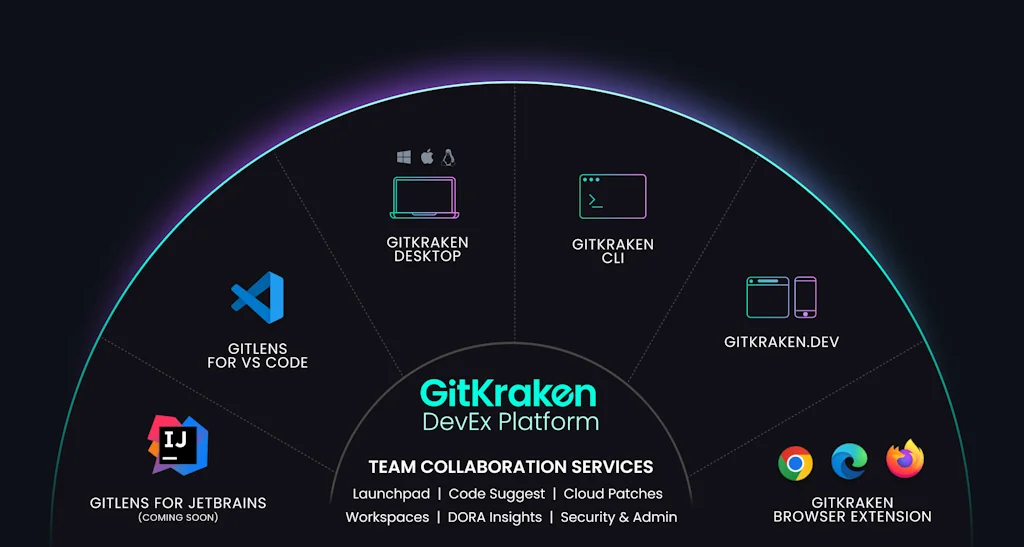
GitKraken's DevEx platform provides a suite of top-rated Git tools that help millions of developers be more productive each day—and teams around the world collaborate more closely. Our products serve developers wherever they are and wherever they code, whether it’s in their IDE, on their desktop, or in their issue tracking system. More than 20 million developers from 100,000 companies around the world rely on GitKraken’s tools to make Git work for them. More information at www.gitkraken.com.
Pros & Cons
Pros
- User-friendly interface
- Boosts productivity
- Visualize git operations
- Dark mode
- Drag-and-drop commits
- Educational tool
- GitHub integration
- Regular updates
- Stage individual lines
- Streamlines collaboration
- Visual commit graph
Cons
- Issues with large repos
- Slow performance
- Critical bugs
- Price
- Visual commit graph
Tool Details
| Categories | Team collaboration software, Issue tracking software, Git clients |
|---|---|
| Website | www.gitkraken.com |
| Added | December 11, 2015 |
| Platforms | Web · iOS · Android |
| Social | Twitter · Instagram · Facebook · LinkedIn |
Recent Reviews (9)
Super powerful git client that rivals with others much more stablished. Powerfully-complex but clean UI, white and dark themes, and many of the git operations built-in in their menus. The only thing that I lacked was a way to turn off the graph view (I like to see just the commits of the branch I'm working on)
Gives you a feeling of extra safety and less stress, as you don't need to think much whilst using it. One con is it can be a little slow when in a very large repo.
Big shoutout to GitKraken for making our Git ops smooth and effortless! 🐙⚡ Their intuitive interface and powerful tools keep our workflows clean and our team in sync. A must-have for any dev team!
As a developer, I value GitKraken for how it transforms the most complex Git operations into simple, visual actions. Its visual commit graph is the best way to instantly understand a project's structure without parsing logs in the terminal. It's because of this interface that tasks like resolving merge conflicts or performing an interactive rebase cease to be a source of stress. The ability to see conflicts visually and to drag-and-drop commits to alter history are the features that save me hours of time and prevent mistakes. Beyond these major tasks, GitKraken also speeds up my daily routine. The ability to stage individual lines instead of the entire file allows me to create clean, atomic commits effortlessly. The integration with GitHub, which displays Pull Requests directly in the app, eliminates the need to constantly switch to a browser. In the end, I still use the command line, but for all complex and visual tasks, GitKraken has become an indispensable tool that boosts my speed and confidence.
I'm a total new but could figure out basic solo git/github without even reading about how to do it. I just used this and it was easy. I'm still really new at it but I can see there is a lot going on and i'm looking forward to growing with git / github with this tool. Great interface.
I f*cking lost a day's worth of progress because this f*cking thing cleared my unstaged changes due to a bug. I pay for it yearly, and it is indeed a useful tool, but for this money, you should not experience critical bugs like this.
Great tool. I'm normally a pure shell git user, but this tool has a lot to offer and is awesome in visualizing stuff. My favorite git gui. Only the price could be better, as I use this veeeery seldom (few times a week)
I can't imagine working on Git repos without it.
I love the git flow on this app. Big fan of this, super cool!
Frequently Asked Questions about GitKraken
When did GitKraken become popular?
GitKraken became popular around December 11, 2015.
What are the main advantages of using GitKraken?
The top advantages of GitKraken include: user-friendly interface, boosts productivity, visualize git operations, dark mode, drag-and-drop commits.
What are the disadvantages of GitKraken?
Some reported disadvantages of GitKraken include: issues with large repos, slow performance, critical bugs, price, visual commit graph.
What is GitKraken's overall user rating?
GitKraken has an overall rating of 4.4/5 based on 12 user reviews.
Is GitKraken available on mobile devices?
Yes, GitKraken is available on iOS (App Store) & Android (Google Play).
What type of tool is GitKraken?
GitKraken belongs to the following categories: Team collaboration software, Issue tracking software, Git clients.
Related Team collaboration software Tools

Traw
Replayable whiteboard for remote team
actiPLANS
Flexible all-in-one work scheduling platform

Jumpshare
#1 Work Communication and Creative Collaboration Tool.

Visla
Create polished videos at scale, instantly and effortlessly

Struxe
A More Social Way To Work

Clipse for Google Calendar
Revolutionize group scheduling.
Related Issue tracking software Tools

PushBeacon
Easily send custom notifications to all your devices
Rakuten SixthSense TAP
Your Co-Pilot in Quality Excellence
Better Stack
Unified observability tool
Flat
Simple, delightful, collaborative work tracking

Stepsize
Editor-first issue tracker for a healthy codebase

Huly.io
Open Source All-in-One Project Management Platform
Related Git clients Tools
Github with a cape
Chrome Extension which adds customizable features to GitHub
Graphite
The AI-powered pull request toolchain

Insight.io for GitHub
Navigate GitHub like it's in your IDE

Second
AI-Powered Codebase Maintenance
Fork
A fast and friendly git client for Mac
Sourcery AI
Instant Python refactoring
Compare GitKraken :





Don't Get Fooled by Fake Social Media Videos
The world's first fact checker for social media. Paste any link and get an instant credibility score with sources.
Try FactCheckTool Free