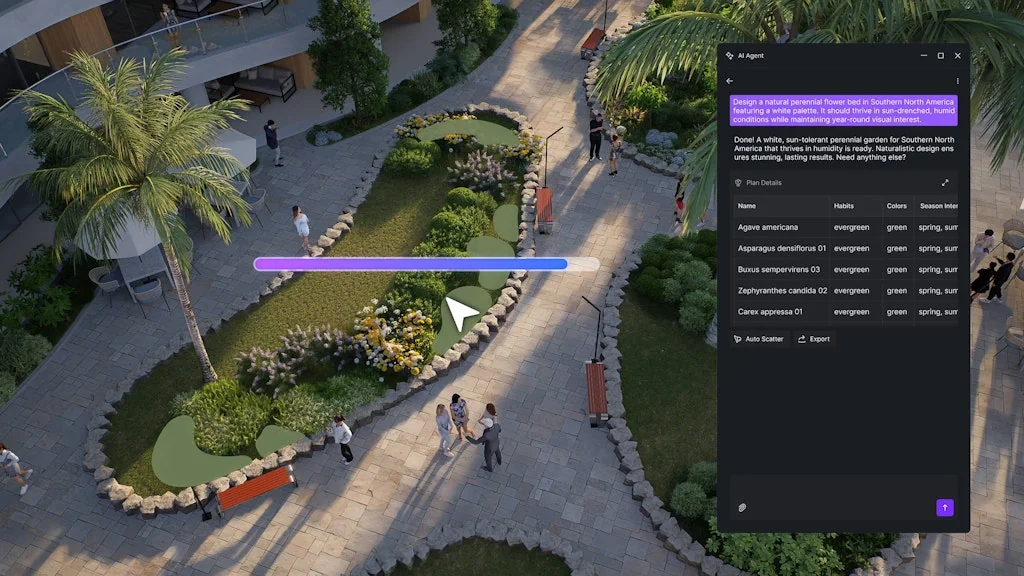
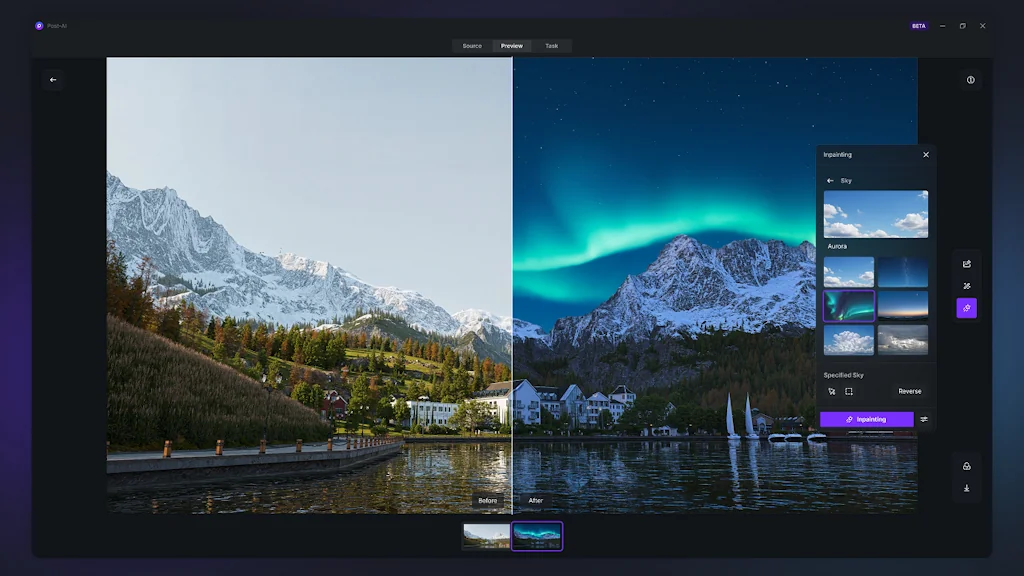
I chose D5 Render primarily because it offers the perfect marriage of blazing-fast real-time performance and stunning, photorealistic quality.Unlike many alternatives, D5 Render delivers uncompromised speed thanks to its efficient implementation of real-time ray tracing. This means I can make lighting and material adjustments and see the final, high-quality result instantly a massive boost to my creative workflow.Furthermore, its seamless integration with SketchUp and its rich, high-quality asset library mean I spend less time preparing and more time designing. The recent additions like AI-powered features have only solidified its position as the most forward-thinking, powerful, and user-friendly render engine on the market today
I use SketchUp software for modeling. This software integrates very well with the D5 Render engine. The D5 Render engine cuts my rendering time in half and allows me to get very high-quality renders. D5 Render is an engine with a great variety of assets and it's very easy to apply. I'm very lucky to have heard about and used this program, and the artificial intelligence support it provides is also a huge advantage. A professional architect should use the D5 Render engine.
The cost of the D5 Pro subscription could be reviewed or slightly reduced to make it more accessible, especially for freelance artists and smaller studios.While the library is already good, it could be continuously expanded and refined, focusing on more niche or regional assets to ensure maximum variety for global users. A huge improvement would be introducing AI-powered conversion of 2D images into basic 3D models (Image-to-3D Model feature). This would be revolutionary for quick scene setup.Community Engagement: To boost user interest, the team could organize regular contests or challenges. Winners of these competitions could be awarded the Pro version for free or receive a substantial period of complimentary access."
Pro version access
Extensive asset library
I chose D5 Render because it provides the perfect balance between real-time performance and high-quality output. Compared to other rendering tools like Lumion or Enscape, D5 offers faster rendering speed, better lighting accuracy, and a smoother workflow. The real-time ray tracing engine and user-friendly interface make it ideal for architectural visualization. It saves me a lot of time while still delivering photorealistic results.
D5 Render is an incredible real-time rendering tool for architects and 3D artists. Its interface is clean, intuitive, and easy to learn, even for beginners. The real-time rendering speed is amazing, and the photorealistic output quality is top-notch. I love how well it integrates with SketchUp and other 3D software — it makes my workflow so much faster and smoother.
Sometimes D5 requires powerful hardware to run smoothly, especially when working with very large or complex scenes. It would also be great to see more animation tools and an expanded asset library in future updates.
I would choose D5 over other rendering software mainly because of how quickly it can deliver a photorealistic image with minimal effort, which matters a lot when working in a tight schedule.
As an architectural student working primarily in Rhino and SketchUp, D5 Render has become an essential part of my visualization workflow. Its real-time rendering capability, simple interface, and live sync make rendering models into photorealistic scenes remarkably fast and enjoyable. The natural lighting engine, asset library, and AI features help me achieve quality visuals without spending a lot of time on post-processing. For academic presentations, D5 allows me to quickly and clearly communicate the atmosphere, materiality, and spatial intent of my project and I would highly recommend my peers to use it.
The asset library in the free community version can be expanded a bit more since other competitors such as Twinmotion offer a wider range of high quality assets which make a great difference while visualizing.
What really makes D5 stand out for me is how effortlessly it integrates with Rhino. The live sync feature saves so much time — every design change updates instantly in D5 without having to re-export the model like in Lumion. That efficiency completely changes the workflow; it lets me focus on refining design and lighting rather than managing files. The material translation from Rhino is also impressively accurate, and D5’s interface feels much smoother and more responsive. Overall, D5 makes visualization feel like a natural extension of the design process instead of a separate task, which is something I could never achieve as smoothly in Lumion.
The real-time rendering workflow feels seamless . materials, lighting, and reflections update instantly, which makes it easy to experiment and make design decisions on the go. The asset library is another strength , high-quality, diverse, and constantly improving, so scenes come alive without needing third-party imports. What I appreciate most is its balance between realism and performance, even complex scenes stay smooth without heavy lag. For someone in architecture, D5 doesn’t just make renders, it helps communicate design intent clearly and emotionally.
Fast performance
Efficient workflow
If pro version is provided for a minimum trial period of 7 days it can be very helpful for students and professionals alike
Hardware demands
Pro version access
Realistic renders
As a small design studio, D5 Render has become our rendering tool of choice because it delivers genuine photorealism without the massive time sink usually associated with high-quality renders.The Best Part is the real-time path tracing is the absolute killer feature. Unlike some competitors where the viewport only sort of looks like the final output, D5's instant feedback is incredibly accurate. We can adjust a light source or a material property and see the final, ray-traced result immediately. This has effectively cut out hours of test rendering. For client presentations, this instant, high-quality visual is invaluable for getting fast approvals.About workflow integration, The LiveSync plugins (especially for SketchUp, which we use a lot) are fantastic. Model changes sync instantly, which means less time exporting/importing and more time focusing on design details. The built-in asset library is also massive and high-quality, saving us the cost and time of searching third-party sites for furniture and detailed vegetation.
User-friendly interface
Seamless integration
High-quality output
The only minor downside is that, while fast, it's still hungry for a decent GPU (RTX is a must for the best performance). Also, the startup can be a bit slow, but once you're in, the clean interface and intuitive controls make up for it.
Extensive asset library
The quality of the renders provided by D5 is far superior than those provided by Lumion and Twinmotion. Also viewing and working with realtime renders is more helpful and efficient which isnt achieved yet by the other two softwares mentioned
It is one of the best rendering application of the current times, providing realtime renders and also enabling faster perfomances when compared to its contemporaries. I was greatly impressed by the attention to details given in each texture and elements, especially the vegetation. Also it seamlessly integrates with rhino and sketchup, which is very for me while working for the design projects
Fast performance
User-friendly interface
Beginner-friendly
Efficient workflow
High-quality output
Real-time rendering
Photorealistic visuals
Extensive asset library
The asset library could be improved as the presence of few elements are very less. Even though the interface can be used easily after a few days of experience, in the initial days it tended to be difficult
Pro version access
Extensive asset library
I chose D5 Render because it’s easy to use, delivers realistic results fast, and works great with my workflow. The AI features and real-time rendering really save time and make the whole process more enjoyable.
D5 Render is truly impressive, it’s very user-friendly and easy to navigate. The AI features are a game-changer, making the workflow faster, smoother, and so much more convenient. It really helps bring projects to life with ease!
Fast performance
User-friendly interface
Beginner-friendly
Seamless integration
Efficient workflow
High-quality output
Real-time rendering
Photorealistic visuals
Extensive asset library
Compatibility with SketchUp
It would be great to see even more AI-driven tools for material and lighting adjustments, plus continued expansion of the asset library. Slight optimization for heavier scenes would also make the experience even better.
I chose D5 Render because it combines real-time speed with high-quality results. It’s intuitive, efficient, and helps me turn my ideas into stunning visuals in no time.
I’ve been using D5 Render for my design projects, and it has honestly made a huge difference in how I present my work. The real-time rendering is incredibly fast, and the lighting and reflections look so natural — they bring my ideas to life instantly.What I love most is how user-friendly the interface is. It’s intuitive, clean, and doesn’t require weeks of learning. Within a short time, I was able to produce stunning visuals that impressed both clients and colleagues.D5 Render has become an essential part of my workflow, and I highly recommend it to anyone looking for a powerful yet easy-to-use rendering tool.
Material Library Expansion: Adding more diverse materials and textures, especially for interior design and landscaping, would make the creative process even smoother.Improved Asset Organization: A tagging or search system for assets would help users find objects more quickly.Performance Optimization: On mid-range systems, larger projects can still cause slowdowns; optimizing memory usage would enhance stability.Animation Features: Expanding animation options — such as camera paths, object movements, or lighting transitions — would open up more storytelling possibilities.
It's great and easy to use. You get great lighting.Even the free version has a lot of potential, and the output is on par in comparison to other expensive software, which speaks a lot about the company. I highly recommend using it for students or small studios as the asset library is the main reason I love it. The new AI tools allow you to do so much more with so little effort.
It's great and easy to use. You get great lighting.Even the free version has a lot of potential, and the output is on par in comparison to other expensive software, which speaks a lot about the company. I highly recommend using it for students or small studios as the asset library is the main reason I love it. The new AI tools allow you to do so much more with so little effort.
Fast performance
User-friendly interface
Beginner-friendly
High-quality output
Real-time rendering
Extensive asset library
Hardware demands
Limited animation tools
Extensive asset library
1. It’s Built for Architects — Not GamersUnlike Unreal or Blender’s Cycles, D5 Render is tailored specifically for architectural visualization.That means:You don’t waste time tweaking complex lighting setups or shader nodes.Everything — from daylight, vegetation, materials, to camera — is designed to feel like a real-world scene setup.It connects perfectly with SketchUp, Revit, Rhino, ArchiCAD, and Blender.You focus on design, not software settings.⚡ 2. Real-Time Ray Tracing = Instant FeedbackThe biggest advantage: What you see is what you get.D5 uses real-time ray tracing — global illumination, reflections, soft shadows — live in your viewport.So when you:Move the sun angle → you instantly see how shadows fall.Change material → it updates photorealistically in seconds.Adjust light intensity → no re-rendering delay.It feels like working inside your design, not waiting for renders to finish.🎨 3. PBR Materials + Asset Library = Professional FinishD5’s PBR material system and huge content library let you reach professional-level realism fast:16,000+ prebuilt assets (plants, furniture, people, vehicles, lighting).Thousands of high-quality PBR materials — polished concrete, teak wood, brushed metal, etc.Animated people, trees, fog, rain, even birds for presentations.You can produce visuals that look like high-end visualization studios — even as a student.💻 4. User-Friendly InterfaceIf you’ve used SketchUp or Lumion, D5 will feel instantly familiar.Simple drag-and-drop workflowLive sync with modeling softwareRealistic preview even before final renderYou can learn it fully within 2–3 days — perfect if you’re balancing studio work and deadlines.🌅 5. Cinematic Results — FastD5’s camera tools make it easy to create:Ultra-realistic stillsAnimated walkthroughsTime-of-day transitions and sun studiesIts “Fantastic” mode (maximum realism) gives global illumination and depth similar to offline renderers like V-Ray — but in a fraction of the time.🪄 6. Great for Thesis and Conceptual WorkFor your upcoming thesis (Sports Institute / Olympic Excellence project):You can show dynamic lighting of stadiums and training zones.Render day-night transitions and interior-exterior sequences.Use animated athletes or crowd elements to give life and human scale.Your presentation will stand out visually and conceptually.💰 7. Free Version is GenerousUnlike many renderers, D5’s free version already includes:Real-time ray tracingFull PBR supportHundreds of assetsHigh-quality still renderingPerfect for students on a budget.
In D5 Render, the term “Fantastic” usually refers to one of the render quality presets or modes that enhances visual output — it’s not just a casual word. Here’s what it means in context 👇🎨 “Fantastic” Mode in D5 RenderWhen you select Fantastic under the Render Quality or Preview Quality settings, it activates the highest-quality real-time rendering mode available in D5.Here’s what it does:Enables full ray tracing (global illumination, reflections, refractions, soft shadows, etc.)Improves material realism, including accurate roughness and metallic effectsEnhances lighting — better bounce lighting, color bleeding, and ambient occlusionMaximizes texture resolution and removes noise for crisp detailsActivates post-processing effects like bloom, depth of field, lens flare, and more⚙️ Other Quality Modes (for comparison)Draft – fastest, low quality; used for modeling or quick navigationMedium / High – balanced modes for quick previewsFantastic – best visual fidelity, slower performance, used for final renders or presentationsSo, when D5 calls it “Fantastic”, it means:➡️ “Maximum realism and visual quality mode.”
🧱 1. Lighting AdjustmentsFantastic mode = better realism, but lighting still needs manual refinement.Use HDRI lighting with proper sun angle to get natural shadows.Add area lights or spotlights for interiors to balance dark zones.Adjust exposure and white balance in the post-process panel.Use “Sun Ray” for realistic sunlight streaks (great for outdoor renders).🌿 2. Materials and TexturesEven in Fantastic mode, bad materials ruin realism.Use PBR materials (with base color, roughness, metallic, and normal maps).Increase texture resolution (2K–4K if possible).Add imperfections (like fingerprints, dust, or smudges) for realism.Adjust roughness maps — glossy vs matte balance adds realism.🧍♂️ 3. Assets and DetailsReplace default D5 assets with high-quality custom models (from Sketchfab, Quixel, etc.).Add small props like cables, planters, signage, and floor imperfections — they tell a story.Use animated assets (trees swaying, people moving) for presentation scenes.🌤️ 4. Camera & CompositionSet focal length (35–50mm) for realistic human-eye perspective.Enable Depth of Field (DOF) for focus and depth layering.Use the Rule of Thirds grid for better composition framing.Slight tilt or perspective correction gives a cinematic feel.🪄 5. Post-Processing EffectsEven Fantastic mode benefits from subtle tweaks:Adjust contrast, bloom, vignette, and ambient occlusion.Use color grading LUTs for filmic or stylized tones.Tune Sharpness slightly (too much looks fake).If exterior — reduce fog intensity for clarity.⚙️ 6. Performance OptimizationFor smoother real-time preview, lower quality temporarily (e.g., “High”) while adjusting.Use DLSS / Ray Tracing optimization if your GPU supports it.