

Jira
How teams do great
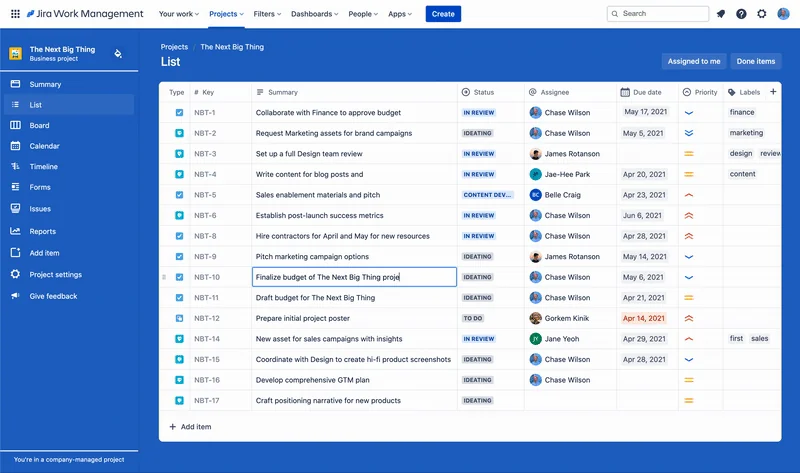
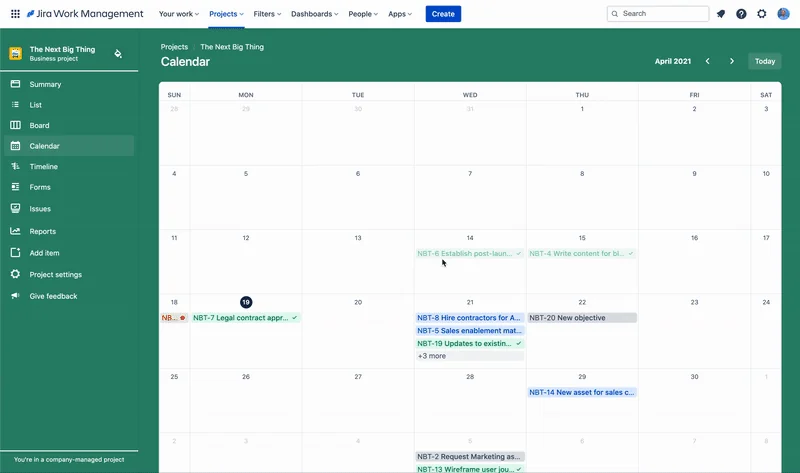
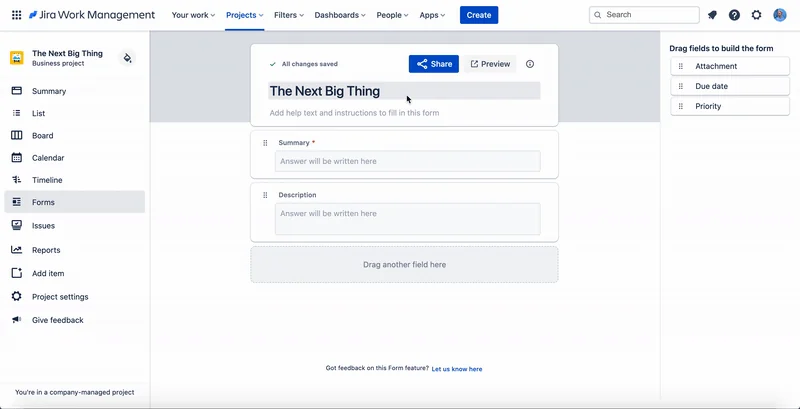
What is Jira?
Create and track feedback for Atlassian products.
Pros & Cons
Pros
- Project management
- Task tracking
- Collaboration features
- Customizable workflows
- Issue tracking
- Integration with other tools
- Agile support
- Sprint planning
- Reporting tools
- Roadmap view
- Community support
- Automation features
Cons
- Complex interface
- Clunky UI
- Steep learning curve
- Overwhelming options
- Slow performance
Tool Details
| Categories | Project management software, Team collaboration software, Issue tracking software |
|---|---|
| Website | www.atlassian.com |
| Added | April 29, 2021 |
| Platforms | Web |
| Social | Twitter · Instagram · Facebook |
Recent Reviews (13)
As a tester, I work on Jira a minimum of 4 days a week. While it is really easy and convenient to track the tickets and bugs' progress and keep it in one place, the logging of bugs takes a lot of time as Jira is starting to throw errors while uploading media and making the process lengthier. Also, they should work on improving it for Linux users so that we can add screen recordings directly. Otherwise, it's good with all its other features like different project boards for easier project management, their sprint planning and tracking template, and many more templates. Their confluence for keeping documentation also in one perfect place and allowing restricted access makes life easier and simpler. And their app is also quite user-friendly!
We started with Azure Dev Ops, recently moved to Jira, night and day! We'll be sticking with them for the forseable future.
Thanks to Jira's workflow features, we can collaborate effectively despite working remotely and asynchronously. Every task, from initiation to division among different functions, to final completion or handover, requires a collaborative and project management tool. Jira has greatly assisted us in this regard, making our daily execution work much more efficient.
I considered alternatives like Trello, Asana, and ClickUp, but Jira felt more robust for issue tracking and agile workflows. It offers better sprint planning, customizable workflows, and strong reporting, which makes it a better fit for product and engineering teams.
I also used tools like Trello and Asana. They were simpler, but Jira felt more reliable for complex workflows and long-term projects.
It scales better than the simpler tools. We needed proper sprints, reporting, and integrations, and Jira already had them. A bit harder to learn, but more future proof.
Jira is one of those tools you kinda love and hate at the same time — and I mean that in the best possible way. It does what it promises: keeps issues tracked, workflows organized, and the team (mostly) in sync. Once it's set up right, it's solid. Powerful, flexible, and surprisingly good for managing even weird non-dev tasks if you customize it enough. But — and here’s the “not-quite-5-stars” part — the UI still feels clunky at times. Too many clicks to do simple things. The performance can lag when you’ve got tons of tickets or complex filters. And don’t get me started on trying to onboard new team members without them staring at the screen like it's a spaceship dashboard. That said, when it works (which is most of the time), it really works. The automation rules, integration options, custom fields, all of it makes sense once you’re deep in the ecosystem. So yeah — 4/5. Not perfect, but still the best in its category. Just be ready to wrestle with it a bit before it bends to your will.
Jira brings to mind that quote about programming languages: “There are only two kinds of languages: the ones people complain about and the ones nobody uses.” I complain about Jira daily. I don't like its UI. I don't like how it creates new items and puts them out of order. But no other tool is as comprehensive as it. There's no other tool (except maybe Notion) that's as good at making sure you get things done. So I complain about Jira. But I use it because it works.
I use Jira daily with my team to manage projects and keep track of every task. The detailed issue tracking allows us to spot problems early and assign work clearly. While the interface can feel complicated at times, its powerful features help us stay organized and meet deadlines consistently. It supports our workflow well and improves team communication. Overall, Jira is a dependable tool that drives our projects forward, even if it takes some time to master.
My company chose it.
I use Jira for project management, and it’s fantastic for tracking tasks and managing workflows. The customizable boards and detailed reporting really help keep my team organized and on schedule. However, the learning curve can be steep for new users, and sometimes it feels a bit overwhelming with all the features. Still, it’s an incredibly powerful tool for keeping projects on track.
Jira is great for tracking bugs, linking test cases to user stories, and collaborating with developers. The integration with test management tools adds a lot of value. However, customizing workflows for QA can be a bit clunky, and the UI isn't always intuitive. Still, it's a reliable platform for keeping QA aligned with the dev team.
Jira ist ein absoluter Gamechanger im Projektmanagement! Die anpassbaren Workflows und agilen Boards (Scrum/Kanban) machen die Aufgabenverfolgung zum Kinderspiel. Die nahtlose Integration mit Tools wie Confluence und Slack hält Teams synchron, während Echtzeit-Updates für Transparenz sorgen. Zwar gibt es eine kleine Einstiegshürde, aber der Gewinn an Produktivität und Organisation ist enorm – perfekt für Startups bis hin zu Großunternehmen. Die mobile App und die benutzerfreundliche Oberfläche machen die Zusammenarbeit super einfach. Ein Muss für agile Teams! 🚀
Frequently Asked Questions about Jira
When did Jira become popular?
Jira became popular around April 29, 2021.
What are the main advantages of using Jira?
The top advantages of Jira include: project management, task tracking, collaboration features, customizable workflows, issue tracking.
What are the disadvantages of Jira?
Some reported disadvantages of Jira include: complex interface, clunky UI, steep learning curve, overwhelming options, slow performance.
What is Jira's overall user rating?
Jira has an overall rating of 4.7/5 based on 145 user reviews.
What type of tool is Jira?
Jira belongs to the following categories: Project management software, Team collaboration software, Issue tracking software.
Related Project management software Tools

Comp AI - Get SOC 2, ISO 27001 & GDPR
The Open Source Vanta & Drata Alternative

Atwork
Your Work OS, Supercharged by AI

Product Manifesto
10 principles for building better products
get-aboard
Convert your onboarding process into interactive roadmaps.

Whenable
Roadmap Your Life.
Skipp
Build the TOP remote tech team
Related Team collaboration software Tools




Related Issue tracking software Tools






Compare Jira :




Don't Get Fooled by Fake Social Media Videos
The world's first fact checker for social media. Paste any link and get an instant credibility score with sources.
Try FactCheckTool Free