

Trello
Visual collaboration with a shared perspective on projects
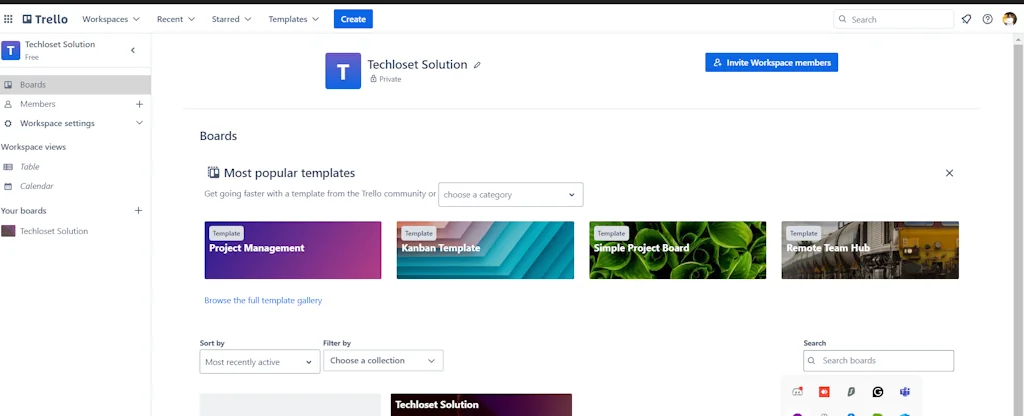
What is Trello?
Trello is a web-based Kanban-style list-making application. Originally made by Fog Creek Software in 2011, it was spun out to form the basis of a separate company in 2014 and later sold to Atlassian in January 2017.
Pros & Cons
Pros
- Task management
- Simple interface
- Team collaboration
- Visual project management
- Kanban-style boards
- Integration with other tools
- Customizable workflows
- Automation features
- Checklists
- Drag-and-drop interface
- Free version
- Mobile app
- Real-time updates
- Custom fields
Cons
- Limited for complex workflows
- Limited free version
- Expensive paid version
- Glitchy interface
- Slow performance
Tool Details
| Categories | Project management software, Team collaboration software, Issue tracking software |
|---|---|
| Website | trello.com |
| Added | December 2, 2013 |
| Platforms | Web · iOS · Android |
| Social | Twitter · Instagram |
Recent Reviews (13)
Trello is a high-performance, web-based Kanban-style list-making app that has changed the way I manage tasks. Since its inception by Fog Creek Software in 2011 and eventual spin-off into a separate entity in 2014, it has continually evolved, especially after its acquisition by Atlassian in 2017. The intuitive drag-and-drop interface makes organising tasks and tracking progress simple and effective. For anyone looking to improve productivity and streamline their workflow, Trello is an invaluable tool. I have implemented this tool in more than one project of mine and have been very pleased with its performance.
As a Project Analyst, I have a number of tasks at hand and in priority along with different teams or within teams different members or different domains, it's a hassle to manage on the docs or sheets or even penning them down. But using Trello, it's been really useful with the different PM templates and the way we can create our tasks as checklists or any other format. Plus with different cards and pipeline stages that can be created, it becomes easier to track and process it mentally by just seeing it once. Lastly, I love the satisfaction I get by scratching that out with just the click of the box.
Trello played a crucial role in organizing the development of Reader Mode 2.0. Its intuitive Kanban-style boards made it easy to track tasks, plan features, and collaborate efficiently. It also helped in collecting and organizing user feedback, ensuring that improvements were based on real user needs. With labels, checklists, and automation, it kept the project on track and streamlined the workflow
I’ve used it for years, and it’s consistently reliable for managing projects and staying on track.
The best thing I like about Trello is the ease of use itself. It really helped us to collaborate with team members to complete our tasks. Our team was working in a shift and it was very hard for each tech to transfer and explain the work they have completed to the upcoming techs. After using Trello it became so easy and we were able to save a lot of time. Trello also offers many plugin integrations which was not that much useful for us. However, all the other features were really helpful. We never came across any technical issues with their service.
Trello is an exceptional project management tool for small teams and projects, which I have used extensively. Its user-friendly interface and flexible board system provide a clear overview of tasks and their current status. However, some of the essential features that I required to enhance my productivity were only available in the paid version. Despite this limitation, I still highly recommend Trello, as it is a powerful tool that is simple to use and offers excellent collaboration features to streamline project management.
I love Trello and use it for everything! The simplicity at first glance is amazing and the automation in the background is wonderful. I only give it 4 stars cause since a while they fuck up basic shit like sycronizing between different devices, working with the tool offline even if you installed the App / Software locally. But overall really happy to have it.
I've used a few project management apps since my first project management job over 15 years ago. I still refer and use Trello because of it's simplicity and ability to add images. In certain industries especially working with creatives and real estate professionals, its a huge plus to see images without having to go into tasks and folders.
We’ve used Trello off and on to track feature requests. I personally use it to organize weekly priorities. It’s easy and flexible. Over time though, we needed more advanced features. Still, it’s a great entry point for visual task management that’s easy to pick up.
Trello is a high-performance, web-based Kanban-style list-making app that has changed the way I manage tasks. Since its inception by Fog Creek Software in 2011 and eventual spin-off into a separate entity in 2014, it has continually evolved, especially after its acquisition by Atlassian in 2017. The intuitive drag-and-drop interface makes organising tasks and tracking progress simple and effective. For anyone looking to improve productivity and streamline their workflow, Trello is an invaluable tool. I have implemented this tool in more than one project of mine and have been very pleased with its performance.
Trello hepls a lot for our team's productivity and organization. Its intuitive interface allows us to create boards for different projects, with lists and cards that help us track tasks and progress seamlessly. The drag-and-drop functionality makes it easy to prioritize and update tasks, while the ability to add due dates, checklists, and attachments keeps everything in one place. Collaboration is a breeze with Trello, as team members can comment, assign tasks, and get notifications in real-time. It's the perfect tool for anyone looking to streamline their workflow and enhance team coordination.
Trello has been a game-changer in keeping my work life on track and organized. I'm particularly drawn to its visually intuitive interface, which makes sorting through tasks by priority and tracking their completion percentage a breeze. Whether it's planning projects, managing deadlines, or collaborating with team members, Trello's user-friendly design streamlines my workflow and ensures that nothing slips through the cracks. It's become an indispensable tool that I rely on daily to stay productive and focused.
Trello is an essential tool for any marketing team looking to improve productivity and streamline collaboration. With Trello, you can easily manage projects, track progress, and assign tasks to team members, all in one centralized platform. I especially love the visual interface and customizable boards, which allow me to easily organize and prioritize my work. Plus, the integration with other tools like Slack and Google Drive makes communication and file sharing seamless. If you're looking to take your marketing game to the next level, give Trello a try!
Frequently Asked Questions about Trello
When did Trello become popular?
Trello became popular around December 2, 2013.
What are the main advantages of using Trello?
The top advantages of Trello include: task management, simple interface, team collaboration, visual project management, kanban-style boards.
What are the disadvantages of Trello?
Some reported disadvantages of Trello include: limited for complex workflows, limited free version, expensive paid version, glitchy interface, slow performance.
What is Trello's overall user rating?
Trello has an overall rating of 4.8/5 based on 108 user reviews.
Is Trello available on mobile devices?
Yes, Trello is available on iOS (App Store) & Android (Google Play).
What type of tool is Trello?
Trello belongs to the following categories: Project management software, Team collaboration software, Issue tracking software.
Related Project management software Tools



Related Team collaboration software Tools
Bizplan
Build Your Plan, Grow Your Business

Lanteria HR
The All-In-One HR Solution powered by Microsoft

Makeswift
An elegant no-code, Next.js website builder

Pagerly
Manage Rotations, Oncalls, Incidents & Ops over Slack.

Chipmunk 🐿️
Powerful workflow for smart creative teams.

Kakrola
Kill the tab circus
Related Issue tracking software Tools

Iteration X
The AI-Native Project Management App

QA Compass
Master your bug reports
not8
Shareable sticky notes for team website review and feedback

API Patrol
Create API and website uptime alerts in 30 seconds
StoriesOnBoard
The user story mapping tool

Observer
Insightful Monitoring, Smart Optimization
Compare Trello :




Don't Get Fooled by Fake Social Media Videos
The world's first fact checker for social media. Paste any link and get an instant credibility score with sources.
Try FactCheckTool Free