
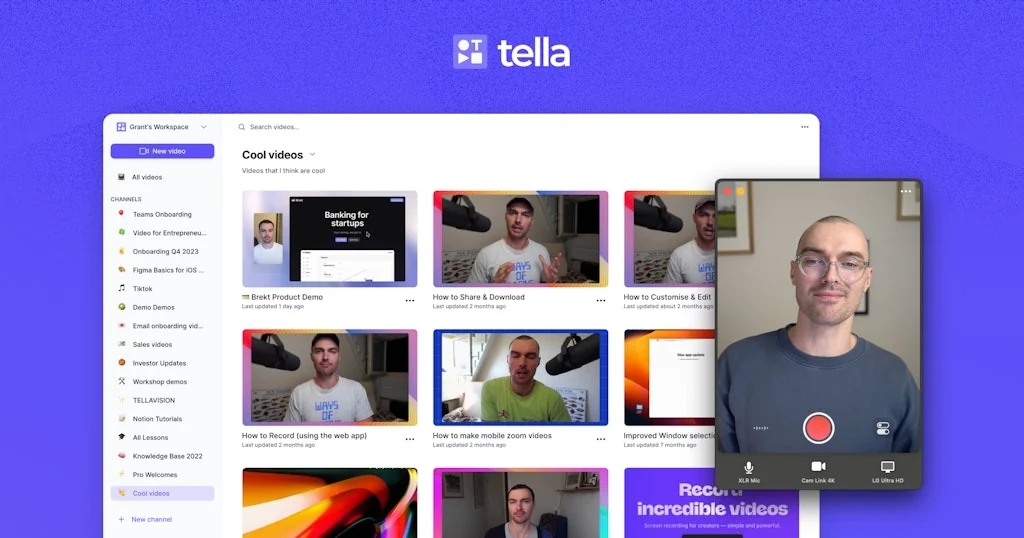
What is Tella?
The screen recorder that edits videos for you.
Pros & Cons
Pros
- Easy to use
- Screen recording
- High quality output
- Mac app
- Video editing
- Zoom feature
- Engaging transitions
- Personalization
- AI video editing
- Area selection
- Chrome extension
- Free version
- Multi-clip recording
- Speaker notes
Cons
- Buggy
- Ai summaries
- Limited feature set
Tool Details
| Categories | Screenshots and screen recording apps |
|---|---|
| Website | tella.tv |
| Added | July 29, 2020 |
| Platforms | Web |
| Social |
Recent Reviews (13)
Tella is awesome! I spend multiple days finding the best tool for recording videos for product launch. I can confidently say that Tella meets all expectations. One small suggestion: It would be good to be able to change the speed of the split parts.
Tella is a core part of my workflow for making product tutorials, marketing videos and even customer service videos, love the new mac app and the ability to zoom in on particular areas!
When I want my videos to stand out I use Tella. Great team and love to see you iterating with new features like zoom. As always the interface is clean and easy to use. Keep going, this is one of my favourite products!
Tella is such a thoughtfully designed piece of software. It’s the little things like centring yourself on camera after recording it, or easy transitions - beyond ‘just recording’ that gives your videos that extra bit of polish for the viewer on the other end. It’s taken our demo, tutorial and sales videos to the next level. For anyone currently using Loom (now owned by Atlassian) just make the switch - you won’t regret it. I still had a few months left on my annual Loom subscription and still made the switch.
I recently discovered Tella for Mac, and it has quickly become my favorite screen recording app. The interface is clean and easy to navigate, and I love the ability to record multiple clips at once. The annotation tools are also a nice touch and have come in handy when explaining ideas to my colleagues. One feature that really sets Tella apart from other screen recording apps I've tried is the ability to select specific areas or windows to record. This is especially helpful when I don't want to share my entire screen, but only a specific part of it. Plus, the ability to record multiple clips in one session saves me a lot of time and hassle. Another great feature that I've found useful is the ability to add speaker notes to my recordings. This is a nice touch that makes it easier for me to remember what I was talking about during the recording. Overall, I highly recommend Tella for Mac to anyone looking for a reliable and user-friendly screen recording tool. With its multi-clip recording, window and area selection, several preview styles and speaker notes features, it's a must-have for anyone who needs to create video content regularly.
Had a chance to play around since last week. Although I prefer working in a browser for most of the tools, when it comes to video recording and editing a local software is unbeatable. And tella for Mac won't disappoint you, I´ll promise. Neat and shiny, as we know it from the browser extension now also with good performance which when editing videos is important.
I think it is the best screen recorder app right now. I've been using LOOM for a very long time, made the switch to Tella, and I'm just using the free version, which is really good. Highly recommended!
I've recorded almost 50 videos with Tella in 8 months. I can see how they improve the product every day. Thanks for the Mac App; it'll make the experience even better ✌🏼
Just started to use Tella for Screen Recordings on PC/Windows. Love the simple set of tools and it's great that I can use it through a Chrome Extension.
I enjoyed the tool until bugs happened. I would record for 30 mins and after hitting save I find that it only saves like 30 seconds
Tella has been so helpful in quick explainers!! Best tool if you're looking to send quick updates and don't have the time to hop on a call! We LOVEEE Tella at Social Currant!!!
I’ve produced five times more videos this year because of Tella. It saves me production time, and the results look great.
pretty buggy at times + a relatively limited feature set | but also the only tool out there that can make such beautiful demo videos
Frequently Asked Questions about Tella
When did Tella become popular?
Tella became popular around July 29, 2020.
What are the main advantages of using Tella?
The top advantages of Tella include: easy to use, screen recording, high quality output, mac app, video editing.
What are the disadvantages of Tella?
Some reported disadvantages of Tella include: buggy, ai summaries, limited feature set.
What is Tella's overall user rating?
Tella has an overall rating of 4.8/5 based on 34 user reviews.
What type of tool is Tella?
Tella belongs to the following categories: Screenshots and screen recording apps.
Related Screenshots and screen recording apps Tools
Xnapper
Take beautiful screenshots instantly

CursorFlow
Highlight your cursor and keystrokes on macOS.

Usersnap
Guide your product journey with insights that matter

Trailer
Create beautiful app marketing videos in minutes

Bird Eats Bug
Report bugs. Create tests. Really fast.

Jumpshare
#1 Work Communication and Creative Collaboration Tool.
Compare Tella :



Don't Get Fooled by Fake Social Media Videos
The world's first fact checker for social media. Paste any link and get an instant credibility score with sources.
Try FactCheckTool Free