
What is Workstatus?
Workstatus is a work intelligence platform built for service organizations where time, delivery, and margins matter. It is used by teams ranging from 50 to 500+ employees across IT services, digital agencies, BPOs, consulting firms, and field operations. Workstatus unifies time tracking, project activity, attendance, and field data into a single system of record.
Pros & Cons
Pros
- Time tracking
- User-friendly interface
- Attendance tracking
- Task tracking
- Geofencing
- GPS tracking
- Intuitive dashboard
- Real-time reporting
- Actionable insights
- Automatic timesheets
- Productivity boost
- Team collaboration
- AI-powered features
- All-in-one platform
- Cross-platform support
- Easy installation
- Offline tracking
- Project analytics
- Project management
Cons
- Limitations in analytics
- Occasional glitches
Tool Details
| Categories | Time tracking apps |
|---|---|
| Website | www.workstatus.io |
| Added | September 13, 2021 |
| Platforms | Web |
| Social | Instagram · Facebook · LinkedIn |
Recent Reviews (10)
I’ve been using Workstatus for several months, and it has completely transformed how I manage my team. The real-time tracking feature allows me to monitor employee activity and progress on tasks effortlessly, even with remote team members. I particularly appreciate the automated time tracking and reporting tools—they save me hours of manual work each week. The mobile app is intuitive, making it easy for my team to log hours and update tasks on the go. Overall, Workstatus has improved productivity, streamlined communication, and helped me make data-driven decisions. I would highly recommend it to any business looking for a reliable workforce management solution.
I started using Workstatus about 8–9 months ago, mainly for project management, task tracking, and attendance and so far it’s been a real game-changer in managing my daily work. Setting up and tracking projects is simple, so I always know where things stand. Assigning and updating tasks is quick, which keeps my team aligned without extra effort. The attendance tracking is smooth too, with automatic timesheets and easy check-ins. Even as a first-time user, I’ve found that over these months it has saved me a lot of time, kept everything organized, and given me a clear view of my team’s work.
I recently had the opportunity to use Workstatus, and I must say it has been a game-changer for our team's productivity and project management. As a project manager, I was constantly looking for a tool that could provide real-time insights into my team's progress and help streamline our workflows. Workstatus exceeded my expectations in many ways. First and foremost, the time tracking feature of Workstatus is outstanding. It allows team members to effortlessly track their time spent on different tasks and projects, providing accurate data that enables better project planning and resource allocation. The intuitive interface and easy-to-use timers make it convenient for team members to log their work hours, ensuring transparency and accountability. One of the standout features of Workstatus is its comprehensive project analytics. The tool provides detailed reports on individual and team productivity, including metrics such as active time, idle time, and time spent on specific tasks. These insights have been invaluable for me as a project manager, as they help identify bottlenecks, assess resource utilization, and make data-driven decisions to optimize our workflows.
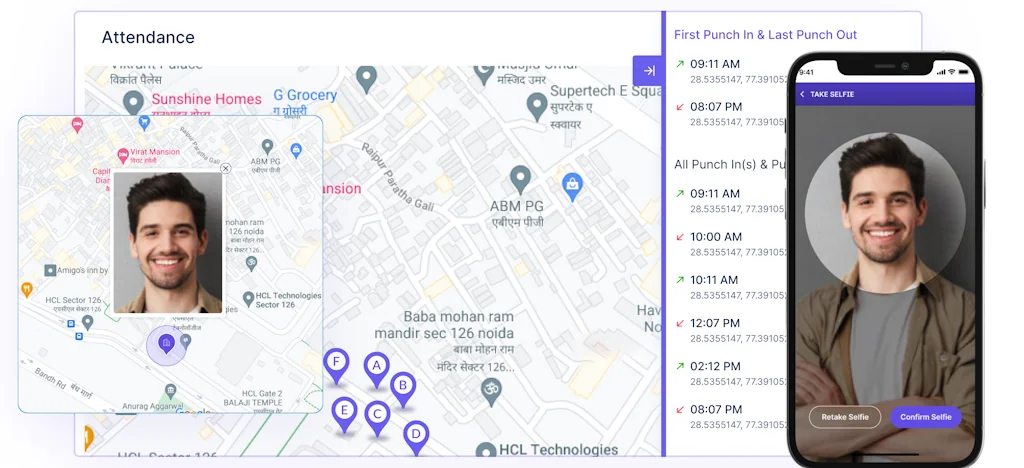
I’ve found Workstatus really useful for managing hybrid, remote, and on-field teams since it brings everything into one place—project management, time tracking, and employee monitoring. Features like GPS/geofencing, productivity reports, Kanban boards, and even facial recognition for attendance made it easier for me to stay on top of tasks and team performance without juggling multiple tools.
I've been using Workstatus for managing my team, and it has truly transformed the way we work. The platform’s intuitive interface makes it incredibly easy to track employee hours, monitor productivity, and manage projects seamlessly. Its real-time reporting and analytics have given me clear insights into my team’s performance, allowing me to make data-driven decisions. What I love most is the GPS tracking and geofencing feature, which is perfect for managing remote teams. With this tool, I have peace of mind knowing exactly where my team members are working from, without any need for micromanagement. Overall, Workstatus has saved me hours of manual tracking, increased transparency, and helped improve overall productivity. It's an essential tool for anyone looking to optimize their workforce management!
I recently had the pleasure of using Workstatus, an employee management system, for my business, and I must say I was thoroughly impressed with its functionality and ease of use. Firstly, the interface was very user-friendly and intuitive, making it easy to navigate and use. The platform has a wide range of features that make employee management a breeze, such as tracking employee hours, tracking project progress, and generating reports. What I found most impressive about Workstatus was its ability to provide real-time updates on employee activity and project progress. This allowed me to keep track of how my employees were spending their time and make necessary adjustments to ensure that projects were completed on time and within budget. Overall, I highly recommend Workstatus for any business looking for an efficient and effective employee management system.
Workstatus offers a powerful set of tools designed for today’s hybrid, remote, and on-field teams. It brings everything into one platform—project management, employee monitoring, and time tracking. With features like time mapping, GPS/geofencing, screen monitoring, idle detection, productivity reports, Kanban boards, Gantt charts, invoicing, facial recognition attendance, and shift scheduling, it covers all the essentials for managing teams efficiently.
I've been using Workstatus for a while now, One of the standout features of Workstatus is its intuitive dashboard. It offers a visually appealing and well-organized interface that makes it easy for employees like myself to navigate through various tasks. I appreciate how quickly I can access information about my work schedule, project assignments, Workforce Management Software, and other important updates.
I've been using Workstatus for a while now, and one of its standout features is the intuitive dashboard. The visually appealing and well-organized interface makes it easy to navigate through various tasks. I appreciate how quickly I can access information about my work schedule, project assignments, workforce management software, and other important updates.
Workstatus has a user-friendly dashboard and helpful AI-powered features for employee scheduling. However, occasional glitches and limitations in the analytics features are minor drawbacks to consider. Overall, I would still recommend it as a useful tool for businesses looking to streamline their scheduling process.
Frequently Asked Questions about Workstatus
When did Workstatus become popular?
Workstatus became popular around September 13, 2021.
What are the main advantages of using Workstatus?
The top advantages of Workstatus include: time tracking, user-friendly interface, attendance tracking, task tracking, geofencing.
What are the disadvantages of Workstatus?
Some reported disadvantages of Workstatus include: limitations in analytics, occasional glitches.
What is Workstatus's overall user rating?
Workstatus has an overall rating of 4.7/5 based on 13 user reviews.
What type of tool is Workstatus?
Workstatus belongs to the following categories: Time tracking apps.
Related Time tracking apps Tools
Daily Grind. Menubar time tracker
Less Features, More Productivity
Kasama
Track your IDE coding habits
Empoche
Automatic time-tracking combined with task management
Day Night
A desktop app that kills the procrastination in you.

SpeedBump
The intentionally annoying app to stop doomscrolling

Face Recognition Attendance system
Contactless, Automatic Cloud based
Compare Workstatus :




Don't Get Fooled by Fake Social Media Videos
The world's first fact checker for social media. Paste any link and get an instant credibility score with sources.
Try FactCheckTool Free