

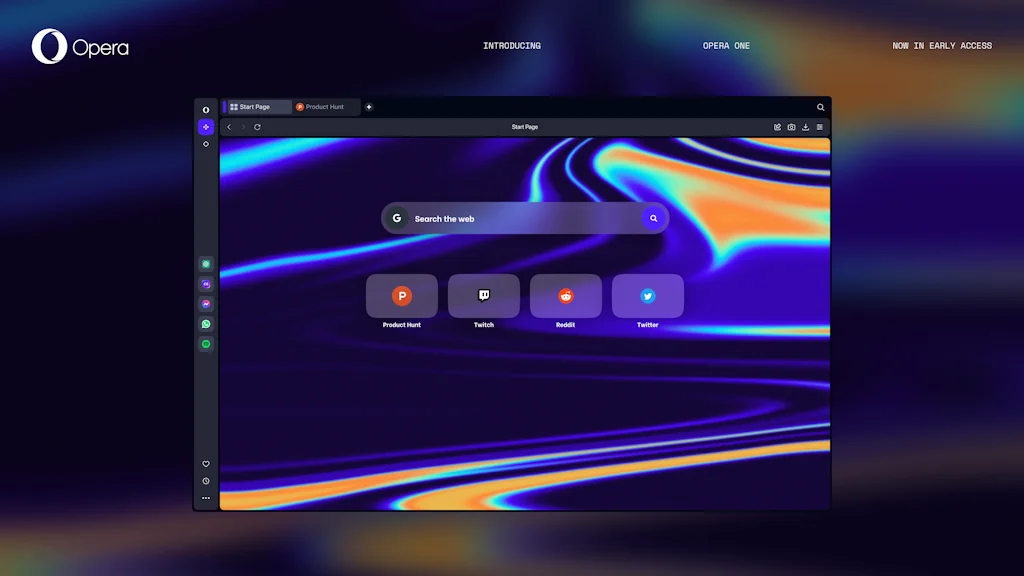
What is Opera?
Meet Opera One - the entirely redesigned Opera browser in early access.
Pros & Cons
Pros
- Fast performance
- Ad blocker
- Built-in VPN
- Privacy features
- AI-powered tools
- Free VPN
- Sidebar integrations
- Battery-saving mode
- Customizable interface
- Hotkeys
- Media player
- Messaging app integration
- Mouse gestures
- Tab synchronization
- Workspace organization
- Crypto wallet
Cons
- High memory usage
- Lack of vertical tabs
- Limited customization
- Sidebar integrations
- Slow performance
- Website compatibility issues
Tool Details
| Categories | Web browsers |
|---|---|
| Website | www.opera.com |
| Added | December 3, 2014 |
| Platforms | Web · iOS · Android |
| Social | Twitter · Instagram · Facebook |
Recent Reviews (11)
Despite in some places, it feels noticeably slower than Chrome. Still, I prefer Opera for rocker gestures (e.g. click RMB than LMB - it acts as the Back button). And extremely convenient Ctrl+Tab behavior when it goes to the tab you previously opened, not just the tab to the right of the current tab
Opera is a seriously underrated browser. It’s fast, lightweight, and packed with useful features that other browsers don’t have by default. The built-in ad blocker and free VPN are game-changers, making browsing smoother and more private. I also love the sidebar with quick access to Messenger, WhatsApp, and Twitter—it’s super convenient for multitasking. Battery saver mode is another great touch, especially on a laptop. The only downside is that some websites don’t always optimize well for Opera, but overall, it’s a great alternative to the more mainstream browsers. Definitely worth trying!
Let's define what I want to say right away. The only reason I writing here is to share my 3 years user experience. An extremely frustrating user experience. GX has become just awful: a couple of useful functions in a heap of absolutely unnecessary junk, as if the browser was builded according to the 10-year-old's desires (from those who choose components for PC depending on how they glow). Gamers are not the ones, who light everything with RGB, gamers are the ones, who are used to hotkeys, fast decision making, having the one clear way to do technical things, and to good UI/UX. And sometimes "good UI/UX" means asceticism and minimalism. Decent features: 1) A sidebar with "workspaces" that work as tab containers abstracted from each other, which allow you to organize real workspaces just with "save tabs from a previous session" setting enabled. (Aaand no, it's not. After 115 update, all tabs opened in separate workspaces move to first one on browser closing. Bravo, devs, I'm not even going to comment on this. Nor will I comment on my desire to continue using a browser with 1,700 tabs casualy shuffled); 2) An adblocker embedded on top of chromium (which sometimes doesn't work with proxies and DoH); 3) The address bar connected with the search bar. Hints when searching from it include tabs from the history, what can be quite convenient; 4) The "panic button", not in the form it presented in, but in the form of some important tab quick access button (why should I come up with myself how to work with the function? Used it to quickly check my mail); 5) GX Control, when it works for some unholy reasons. 6) Synchronization of bookmarks and browser settings between devices via an opera account (the same sync that is available with almost any chromium browser). Opportunity to view a list of tabs opened on another logged-in device (this is proudly called "tab synchronization", although it is no different from bookmarks); 7) Hotkeys settings for many things (except for the things for which there is no such setting, e.g. there are hotkeys for moving to a specific workspace, but there are no hotkeys for moving to the next/previous one; there are hotkeys for moving to the next/previous tab inside the workspace, but there are no hotkeys for moving the tab into another space directly or opening the "move tab" context window); 8) The standard browser UI was pleasant to see before update. Won't comment on new one. Just give you an example of working with "cool looking" settings - searching for specific settings by keywords doesn't return you the settings themselves, It returns whole groups, somewhere inside of which there is a setting you need. Great job, lmao. What about the "junk" part? • Mods are just browser themes named with a word "like in games". However, don't provide any functionality, unlike mods in games. • Sounds and music in the browser. No comments. When someone wants to listen to music, they go and turn on normal music there, where people usually listen to music, and certainly not the music embedded in the browser. Sounds for actions, according to UX teachings, are needed when the user reads the action with them. Here we are talking about a browser where the user has no distractions and his only task is to watch what he clicks. • Profiles. Their functionality is limited to 4 settings checkboxes, which don't really change anything. Are needed for... Used for... Okay, I can't even think of a use for them. In total, here we have: an incognito mode disguised as a profile setting, a mode with browser sounds turned off (which are turned off with one toggle switch in the settings), a mode with browser tabs sound turned off (a browser sound channel mute button disguised as a profile setting, lol) and a performance mode (yeah, performance mode for weak devices in the browser that take disk space with... music. I don't realy know, is the stupidity of this idea really so unobvious that it needs to be explained? There is, at least, opera mini, which combines the performance of performance mode (really that simple!) and the lack of the need to download a full-sized browser.) • The "Dark theme for all pages" function works in a way that would be better if it didn't work in any way. Have you ever heard of "Color the black in grey, and the grey in grey, and in 'de magic ray you will get a mentally unhealthy user, who will never be the same"? No, cause i just made it up. At least here is the visible effort. • 1000 and 1 express panel (new tab screen) settings. Awesome. Let me just remind you that "browsers" are used for "browsing" web pages hosted on the global network, and not for looking at express panel (suspect that devs just forgot about this). All I need from a "new tab" is the opportunity to navigate from it to the page I need. I can do this through the address bar, through the search engine in the address bar, and through bookmarks. Why, in the name of nine hells, duplicate it all on this garbage panel? To spend 2 years improving it instead of fixing bugs, adding real functionality, and working with browser performance? (Yes.) Or to report to investors with a beautiful picture? (...) • Rude ARGB color settings overwriting, aka GX Lights. Why, if all the brands represented have their own flexible settings? Btw, it breaks the Logitech G HUB in some cursed way and neither Opera nor Logitech have fixed this for over a year now, lol. • Mediaplayer with support for major services only. In a world where every major music service has own application with an amazing amount of convenient functions for musics listening (where, let me remind you, do people go when they want to listen to music (not to the browser music)), which can also collapse into a system tray and which also has a separate audio output channel, independent of all other sources? Well... Think again. • Pinboards. So, we have browser themes (which we call mods), we have browser colors (which we call themes), oh the wrong topic... So, we have static bookmarks (which we call bookmarks and which sync), we have dynamic bookmarks (which we call tab synchronization and which sync). Oh, great idea, let's add another static bookmarks (which we'll call Pinboards and which will sync)! Umm, maybe not? Or maybe this is a cool extension of the bookmarks functionality? If so, I'm sorry to inform you, but the bookmarks are in another place. Or maybe it's an attempt to imitate Figma? If so, I'm sorry to inform you, but it's abortive attempt. • Crypto Wallet. Who would ever trust a cryptowallet embedded in a browser? Well, guys, information security exists. • RGX, which makes even the most blurred videos... also grainy. • GX Control, when it doesn't work. (What? I couldn't even figure out any pattern.) • Browser games. No really, browser games (that no one has ever run.) While we live in 2025, opera devs live in 2008 or in 2108 (or they are just trying to convince investors who have never seen real games of their involvement in the gamedev, but shh. I have seen couple of good ones there - just let them go somewhere else. As an indie i just brrrr from this. I would agree that someone might like it, but that someone is not me or other 99% of humanity. Regardless of that, GX games are still somewhere nearby for some godless reasons.) • "Panic button", one scene, no rights reserved - It is made for those who watch, hihihi, special videos, hihi, so that if mom comes in, thay could save their honor! - Well done, but can I go already? - And with the latest release, the long-awaited feature of replacing the browser history with a fake one after 14 days of inactivity has arrived! Because, you know, haha, yes, well, you know, ahahah, yes, you all know, XD, we're such a naughty boys, hihi! After all, we all are degenerates and can't press ctrl+shift+n. Well, It's stupid, but now you can understand what you have to deal with when it comes to this browser. It's just vulgar, putting these jokes in the master-release. You have discord chats for that. • There are a couple more smalls: restrictions on the choice of search engines, a small number of specialized extensions, cutting out some useful functions, rarely released fixes, AI working not for you, but for itself. And we also don't have tab islands :) And that's it. Literally the entire browser consists of this mess. It's like the colorful fortnite customization combined with a snake game. To make a long story short, the only case in the world in which it would be worth paying attention to the GX browser again is if Opera separated the branch with GX for normal people from the branch with garbage for ADHD kids. Now I'm leaving this dump. For those like me can only suggest trying the standard Opera for PC, it seems to have some of the above useful features (and tab islands), or Firefox.
Absolutely loving Opera GX so far. While GX version is optimized for gaming, I'm still finding it quite useful while programming & general browsing too. I'm using it on my Macbook M1 pro & performance, website loading times etc. seem to be better than Chrome. Favourite features: - Free VPN inbuilt in the browser - how awesome is that, no plugin/add-on etc needed - Mods & skins - helps me get in the zone when working on my coding project. - background music! yeah it has some great focus/lo-fi chill beats built right into the browser. - in-built/native integrations for various chat messengers offered by Discord, Insta, Twitter etc. And I'm pretty sure that I've barely used 50% of what the browser has to offer!
Es un buen navegador, aunque la personalización es escasa, no tiene Vertical Tabs, algo que para mí es muy importante. Además cada ventana es independiente con lo que los "Tableros" dejan de tener razón de ser, son simples agrupaciones de pestañas y de islas de pestañas. Eso sí, tiene una gran sincronización de cuenta, el buscador de pestañas es muy útil, Aria no es la mejor IA pero hace su trabajo, y la carga de archivos es muy bonita.
Opera is a fast and feature-rich web browser known for its built-in VPN, ad blocker, and AI-powered tools. It offers a smooth browsing experience with a customizable interface, sidebar integrations for messaging apps, and a battery-saving mode. While not as widely used as Chrome or Firefox, its privacy features and unique tools make it a strong alternative for users seeking security and efficiency.
The best browser out there in my opinion! The sidebar offers access to the main messengers, such as WhatsApp, Telegram and Meta's Messenger, social networks and music streaming services that make our day-to-day life much more fluid.
Opera browser impresses with its array of features, going beyond its built-in VPN to include a media player and AI service, along with a handy utility dashboard.
Opera browser is fast and has useful features like a built-in ad blocker and VPN. It’s easy to use and provides a smooth browsing experience.
its amazing, better than chrome, and i cant live without mouse rocking feature. looks great too (better than chrome). only wish i could add discord to the sidebar.
The browser with built-in VPN has been a real lifesaver for me! It keeps my personal data safe and makes my online experience as comfortable as possible.
Frequently Asked Questions about Opera
When did Opera become popular?
Opera became popular around December 3, 2014.
What are the main advantages of using Opera?
The top advantages of Opera include: fast performance, ad blocker, built-in VPN, privacy features, AI-powered tools.
What are the disadvantages of Opera?
Some reported disadvantages of Opera include: high memory usage, lack of vertical tabs, limited customization, sidebar integrations, slow performance.
What is Opera's overall user rating?
Opera has an overall rating of 4.4/5 based on 15 user reviews.
Is Opera available on mobile devices?
Yes, Opera is available on iOS (App Store) & Android (Google Play).
What type of tool is Opera?
Opera belongs to the following categories: Web browsers.
Related Web browsers Tools



Compare Opera :





Don't Get Fooled by Fake Social Media Videos
The world's first fact checker for social media. Paste any link and get an instant credibility score with sources.
Try FactCheckTool Free