

What is folk ?
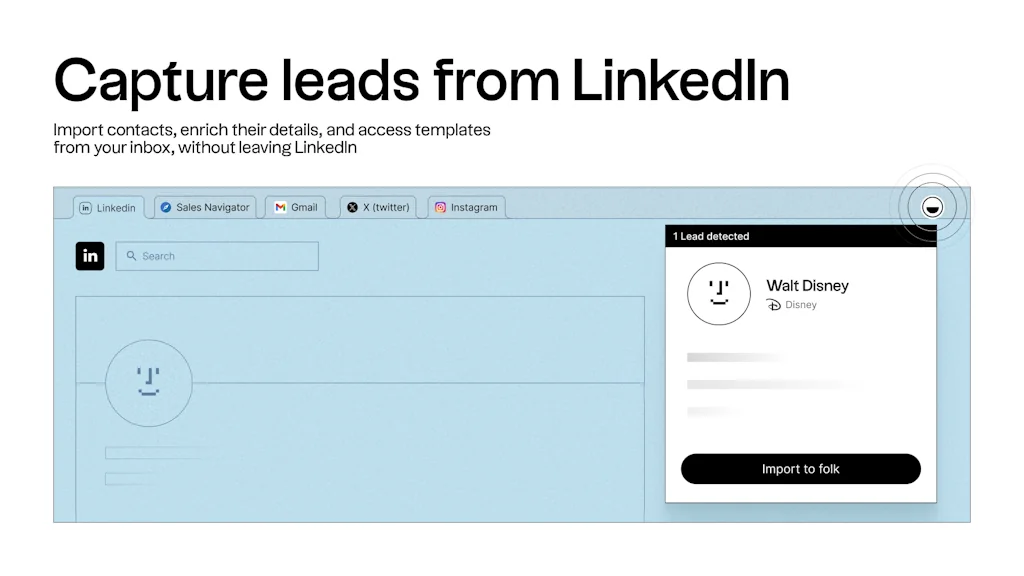
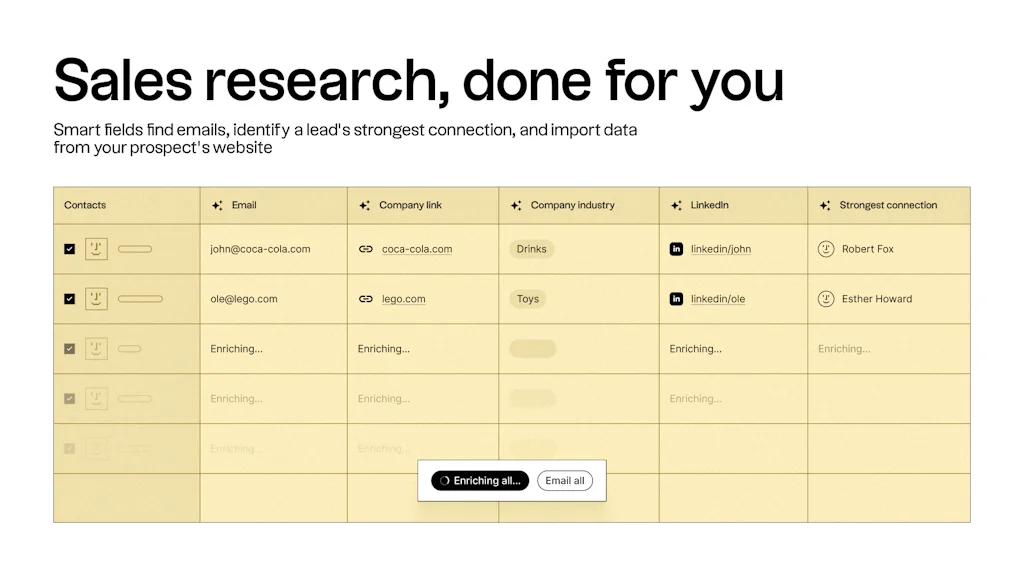
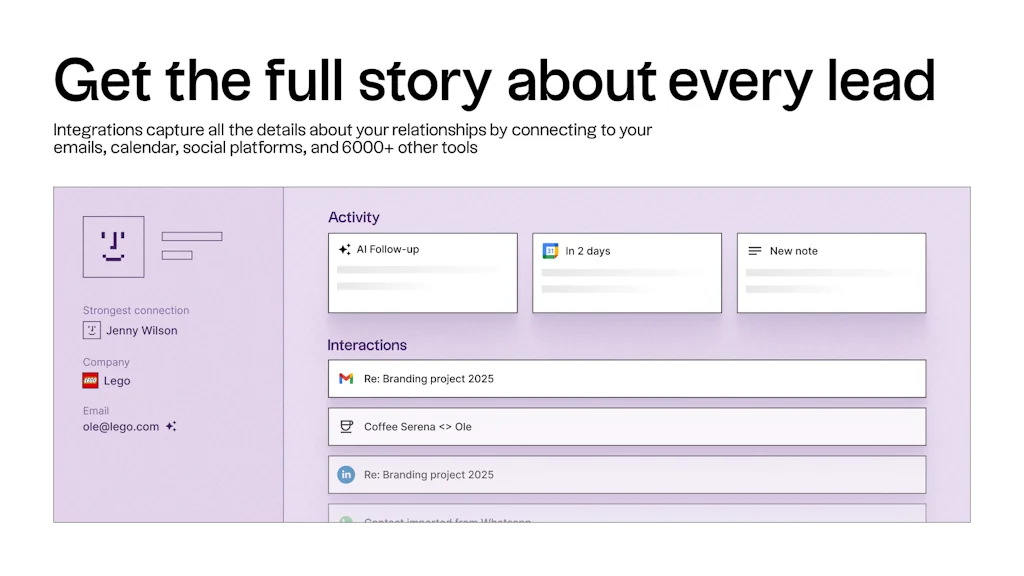
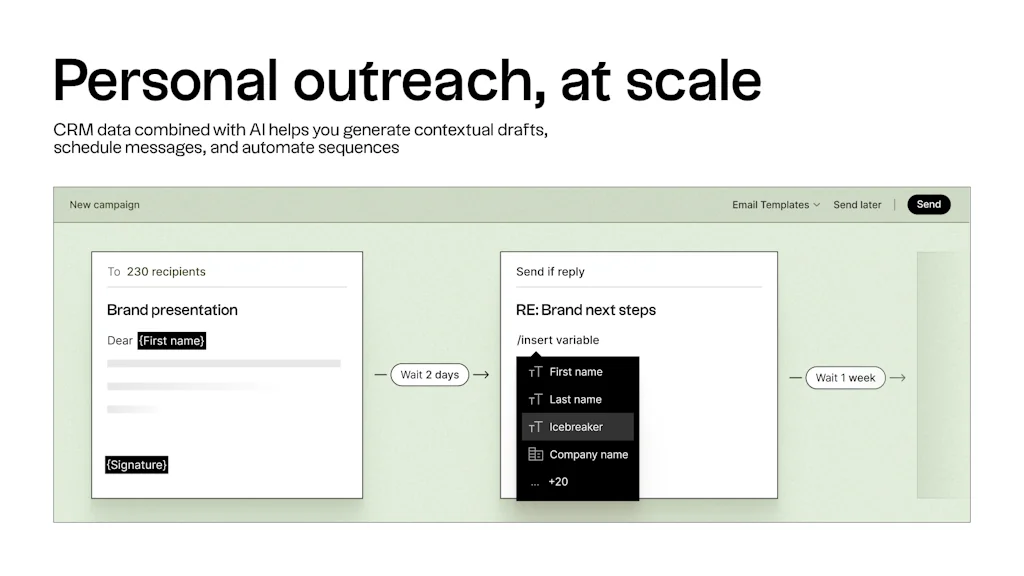
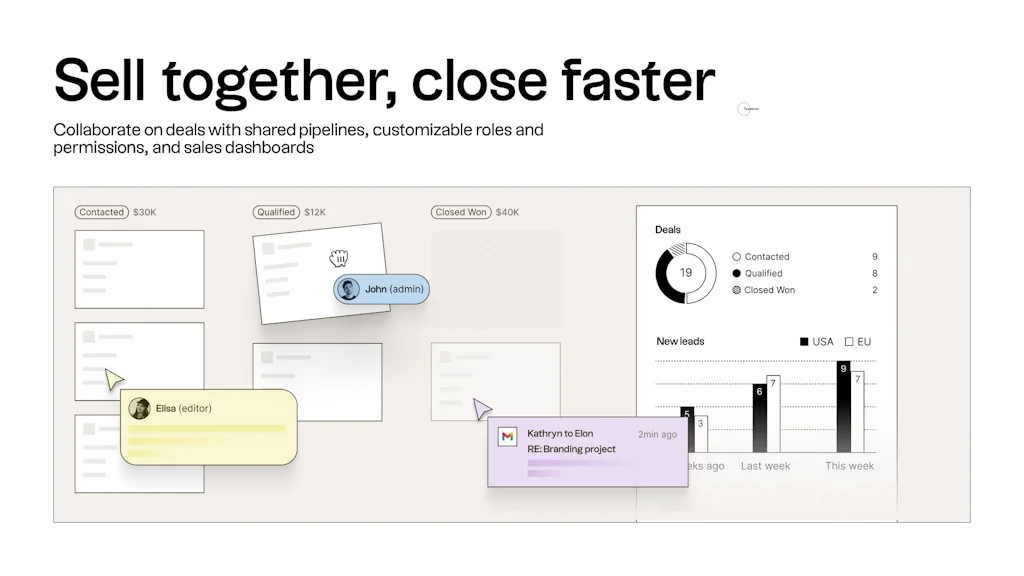
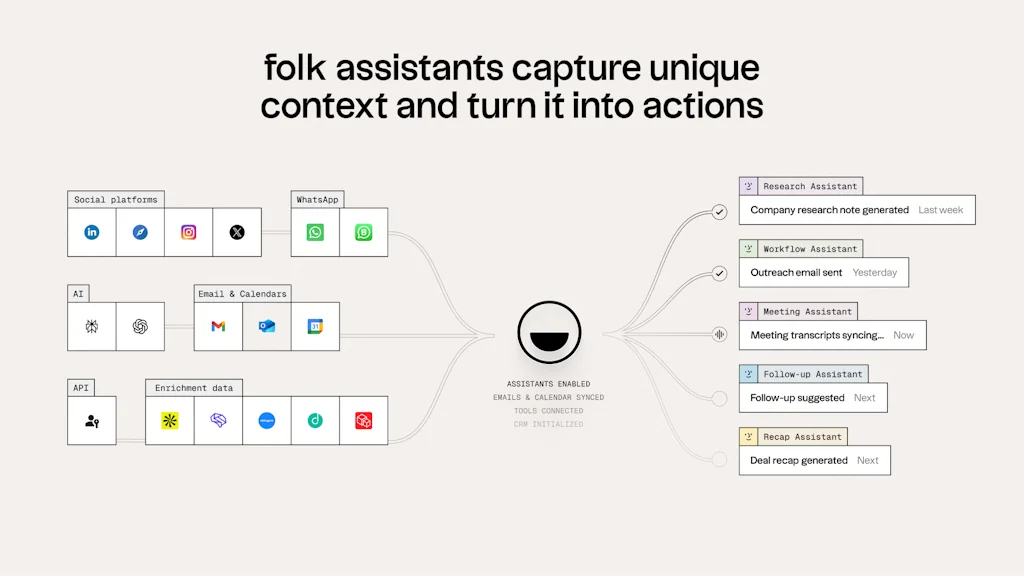
folk is like the sales assistant your team never had. Our CRM is simple, integrated, and proactive. The tool of choice for over 4000+ businesses around the world. folk does the busy work for you, so you can focus on building real relationships.
Pros & Cons
Pros
- AI assistance
- Crm features
- Crm tools
Cons
- Limited functionality
- Slow customer support response
Tool Details
| Categories | Productivity, Marketing & Sales, CRM software |
|---|---|
| Website | www.folk.app |
| Added | May 4, 2022 |
| Platforms | Web |
| Social | Twitter · LinkedIn |
Recent Reviews (13)
Folk is fantastic, I've used it previously with my startup and am considering it for my nonprofit, it's an incredibly thoughtful CRM that (and I can't stress this enough) doesn't become a chore. I spend lots of time with new startups, consistently recommend this, and only ever have had positive feedback returned. The templating speeds things up and the AI + syncing only accelerates it further. The app makes no assumptions and I feel the new features and the enterprise plan will really help this scale. Data migration is a huge help and having used so...so many CRM's this is my winner. The Chrome extension remains one of the only good ones I've used (not calling anyone out d....) and the only integration I feel it may be missing is WhatsApp. Currently, no CRM really does this well. You can fix this with something like krinu.com and Zapier It has one of the better deduplication - most others require long boring processes that folk skips. The enrichment isn't dumb either. It's not just "Oh look we know the company from the email" it's an actual useful tool here. See the icebreaker example Automatic Categorization needs to explanation on why it's useful. I personally haven't used it lately as the pricing doesn't work for our nonprofit, and there's no tier that feels like a "personal" tier however that does not stop it from being a great, and affordable CRM for startups. Firing it up again for free reminds me of that. This is a fast CRM for fast startups, there's a lot of love here and it's rare I call software anything better than "not terrible" let alone get excited by it (From a human)
I started using folk to clean up my contacts and ended up becoming the biggest fan of the batch emailing feature. Not emailing massive contact base (there are other tools for that) but emailing smaller & segregated communities with custom messages that get an amazing open & response rate! (e.g. business angels, beta testers, etc.)
I've been using folk for a couple of months and I love it! It's super easy to use, just sync all of your contacts in folk and then create the workflows you need for yourself and your team. I used to use Notion for managing PR outreach, and I've switched to folk - I'm a big Notion fan but you can't beat a tool that was designed for contacts to manage contacts.
Folk is such a breath of fresh air – it’s like if Notion and a CRM had a beautiful, productive baby. I used to juggle contacts in Google Sheets and my inbox, but since switching to Folk, everything just feels… organized. It’s super intuitive, lets you group people however you want, and the Chrome extension makes grabbing leads from LinkedIn ridiculously easy. The email campaigns with Magic Fields? Total time-saver – I can personalize outreach at scale without sounding like a robot. The interface is clean, the pipelines are customizable, and it doesn’t overwhelm you with unnecessary features. It’s not Salesforce (thankfully), but for founders, agencies, and small teams, Folk nails that sweet spot between simplicity and power. Honestly, I haven’t looked back.
A few things to improve still: - There's only one 'dimension' in the entire app, which is 'People' - This People dimension is great since it's easily linked to 'Company' - That way, People are automatically synced to the companies they work for - This is great since it's a native feature, without need for config (unlike horrible HubSpot) - That means you can have as many views as you want, based on the first People column (which is fixed in folk and can't be moved) Problem: - As someone always looking to connect with my network and seeking job opportunities daily to constantly enhance my career, I need a second 'dimension' in the folk app - That means I would need, in the folk database, a way to list all the jobs I come across (on LinkedIn, from my existing and new contacts, etc.) - Because for now I have to create a specific column, called Type, where I put either: Person or Job - to differentiate between Person rows and Job rows in the same unified My Network database - That way, in my database entries I get to view instantly my people entries and my job entries - That's the only way I found to keep my job search in memory alongside my contacts - The problem is, I use folk's first column People (contact full name) to put the job title of the job ad when I do so, that's the only way I found to keep a clean record of my entire unified DB - Far from perfect, but it works for me; until folk finds a way to expand and provide a Job Seekers feature? - Also the templates section has no Job Seeker template, only Hiring templates (which are useless to me since I'm not a hiring manager, but I'm on the other side) Other small problems: - No native automatic 'created date' and 'last modified date' (such as on HubSpot): it's a small native feature which I don't understand why folk is not implementing. This would save me hourssss of manual work... also without this feature, it's easy to make mistakes when doing updates... the auto-update date precisely addresses this issue - The macOS is kinda slow compared to the app inside of Brave/Chrome which is very fast (especially since the last update). Since the last update the macOS is also faster but not as fast as Brave/Chrome version. When you scroll fast from row 1 to row 1000 for example, it feels not fluid enough in the macOS/Electron app. Not a big deal but still annoying. - Also annoying: Select and Multi-Select cells > you can't press enter to exit the cell and validate the confirmation, meaning you waste time having to click with your mouse outside of the cell > big waste of time when have to do this 100000 times every day - Also annoying: you can't add extra URL columns, for example I need a second URL column to have (1) Linkedin profiles in one and (2) an URL that is an info about my contact, that I can easily click on from the table (and not the contact panel)... problem is, folk only allows a native URL column with only one clickable link. I need two. Tips/other: - Be advised that, unlike other macOS shortcuts and usual workflows, selectioning an entire selection of multiple columns is > click on first row > press Cmd + Maj > click on your last selection row - Cmd + A for select all doesn't work (so you'd have to do same method as above on the entire page > click on first row > press Cmd + Maj > click on your last selection row) - Also, when your paid plan is about to expire (from as early as 7 days ahead) they start threatening you with big red display that you're account is to be 'blocked' (whatever that means). 'Blocked' is a strong word, very intimidating (and their emails too) and it feels like your data is about to be deleted. Other services like Dropbox don't do that, they're more accommodating and will not block you for a few days even after payment is due. Since I'm a monthly subscriber, I don't wanna see this read sign every month 10 prior to the payment. I'll only leave 3 stars because I feel like it's truly a 5 star product but they should pay more attention to this kind of system, design and UX issues.
What I like: - Better and faster than HubSpot on everything for solo individuals like me: both in terms of simplicity (HubSpot is overkill) and pricing (I think 18 USD is a bit too much but I think once I start finishing to enter all my contacts with thousands of contacts folk will be worth it) - The company associated to contacts is the ultimate game changer here. You can see who works at X company in the company view. It's something that HubSpot struggles with and doesn't have from scratch, you have to set up complicated workflows with HubSpot, whereas with folk it's on the spot boom. - Great UX and stack choices, the dev team seems very solid and competent with a vision - Clean up duplicates is great - Network pipeline view is great, exactly what I needed, simple and visual - I haven't used email server yet, looks great. Will have to test it out What I don't like and still needs improvement: - like the person below said, there's no auto "last modification date" and "create date" fields. It wastes me a lot of time. I need these native functions available. In HubSpot it's part of the options. In folk I don't have these columns and therefore I would need to add this info individually for 1'000s of contacts. I don't wanna do that, it's not a reliable option. - the keyboard shortcuts would need to be displayed directly on the screen next to the text for each shortcut available (because it's really confusing for now, you need to go to the help section for now, it's hard to understand, and they use different shortcuts than the rest of macOS apps). For example: select all entries, unselect all, delete entries, duplicate entries, etc. - It's impossible to select multiple columns at the same time (by pressing Cmd to select, like in Excel or any app) to move them from one place to another (big waste of time for me) - It doesn't have a 'Move left' column function like in HubSpot, where you can easily move a newly created column to the left. For now creating a new column is not easy, as I need to go to the right of the table. And I usually have a lot of columns so my screen is very wide... - So we would need to have a '+' on the left as well to create new columns - The 'enrich' option is 'for all entries' only, you can't select to 'enrich' specific columns, which is not very helpful as when you click 'enrich', I don't want to delete the infos I've entered manually. So I decided I'm not using 'enrich' for now. - For example I would want to only enrich people's pictures, or companies logo, not the rest. The 'enrich' feature is too broad and needs more customization. - There's only one native URL column available. I use this one for people's LinkedIn link. It's great you can click on it (unlike Hubspot) and it takes you to the page. But sometimes I would to create extra links in the table. Say Extra link 1, Extra link 2, as clickable URL. For now you have to click on the contact and reach the links. It's a waste of time for me. So please allow to create custom URL columns, not just text. - And finally, there's no previous and next button on the macOS app like in Notion/Slack. This would save me a looot of time with the 3-finger swipe, switching from one page to another, instead of having to click on previous and next each time. - Ah and also, it's impossible to press enter to exit an active cell (like in Excel or any app), you have to click with the mouse in another cell to exit the active cell, which doesn't make sense from a UX standpoint - The three dots (...) in the column headers are too small, one would need to click on the entire column header to open the column menu, because having to click on the three dots (...) is too much work especially when the last column is close to the screen edge I'll put 5 stars when this has been fixed :) Cheers.
Great. Please add "last modification date" and "create date" fields like in HubSpot, which is a deal breaker for me, because without this I will need do manually edit "last modification date" and "create date" by hand for each of my contacts... Imagine I have at least 5'000 contacts, so if you don't provide this feature I cannot start with folk because it will be too much work for me to manually make sure every time I make an edit (and also it needs to be automated, because if it's not automated, it's really easy to make mistakes in the last modified date and created date fields). This is a really simple feature implementation to make from a backend standpoint, so I'm really hoping they will implement it in the next month or so.
I use Folk to manage my affiliates pipeline. Once I've found an influencer on LinkedIn, I add the person (and all his info, job title, company, email,..) in one click in Folk thanks to their extension and then manage my affiliate "pipeline" inside Folk with their Kanban view. I plan to expand my usage to manage all my users/customers in Folk too. + really excited to see that it's now possible to log my LinkedIn conversations inside Folk, that helps me stay organized, know should I follow up to, what have been said the last time. Give it a try, you'll love it.
A very promising CRM that has already a lot to offer. I particularly like their Chrome extension that helps bring LinkedIn (and now Sales NaV) contact data easily (with profile pic and all) to Folk. A tool that is just begging to be used and will delight. Being a user of more established CRMs like Salesforce and Hubspot, I like its simplicity of it. It helps organise one's relationships both professional and personal and a very neat way which the others overkill. Check it out!
Looking at your templates it strikes me that Folk has been conceived from the start as more than a CRM, giving it the potential to support a much broader range of internal company functions (ATS, Event attendance, Community management, etc) and become a central company contact management hub. I would personally love to see v3 bring campaign management functionalities similar to what lagrowthmachine offers. In any event congrats on the product vision
Folk is a CRM that has a different approach than other CRM's. The interface is clear and easy to use. It is not a gas factory like many other CRMs. I used the free version of Folk for a long time. Recently, I took a subscription to be able to have more than 100 leads. My favorite features: - Importing leads with the chrome extension - Sending mail in batch (with customization possible for each message)
Simple and powerful way to set up any contact related projects. I use it for hiring, my investor relationships, working with partners and tracking my deals. I've set up all my processes my own way, feels really taylored
I decided to try Folk after seing friends posting about it on Linkedin ... and I have just been amazed by this product. It's the perfect tool to centralize and organise ALL your contacts. Before Folk I was frustrated because I networked a lot and met lot of great new people every week (I had 5K+ connections on LinKedin) but I couldn't "use" or track my relationships and connections properly, even at short term. Now I use my network in the most optimal way, both professionally and personally. Thanks folk
Frequently Asked Questions about folk
When did folk become popular?
folk became popular around May 4, 2022.
What are the main advantages of using folk ?
The top advantages of folk include: AI assistance, crm features, crm tools.
What are the disadvantages of folk ?
Some reported disadvantages of folk include: limited functionality, slow customer support response.
What is folk 's overall user rating?
folk has an overall rating of 4.8/5 based on 81 user reviews.
What type of tool is folk ?
folk belongs to the following categories: Productivity, Marketing & Sales, CRM software.
Related Productivity Tools

Streak Hunter
Never miss a day on product hunt

CleanRoll AI
AI-powered rent roll standardization for CRE investors

Mnexium AI
Persistent, structured memory for AI Agents

Evoday
Github-like streak calendars for your life habits 👨💻✅

Helium
A floating browser window for your Mac

Impact Diary
All-in-one productivity tool for productive individuals
Related Marketing & Sales Tools

PricingTurbo.
Hand-crafted videos for your SaaS pricing table features

Supercreative
Tools to grow your creative business.

Remotion
Create videos programmatically

Metflix
Learn 1st, Pay us only when you like what you learn

LaunchHunt
Your Ultimate Wingman for Product Hunt Launch

Legend
Automate UGC that promote your product
Related CRM software Tools






Compare folk :





Don't Get Fooled by Fake Social Media Videos
The world's first fact checker for social media. Paste any link and get an instant credibility score with sources.
Try FactCheckTool Free